
10x Coding: AI, Type Hints, and Linting for Python
1. AI-Empowered Coding
Traditionally, one of the most important features of an IDE has been code auto-completion, syntax highlighting, documentation hints, and error diagnostics. As humanity enters the era of deep learning, AI-assisted coding empowers programmers like never before.
We will first introduce several AI-assisted coding tools, followed by a discussion of conventional features like syntax highlighting and documentation hints.
1.1. GitHub Copilot
GitHub Copilot is an AI-assisted coding tool released by GitHub. Based on large-scale corpora and ultra-large deep learning models, combined with extensive programming experience, it provides developers with code completion, code snippet association, and code recommendation. Copilot can automatically generate code snippets or even entire functions based on a line of comments input by the user, offering powerful functionality.
info
In December 2023, Microsoft referred to its AI-powered search engine technology based on ChatGPT as "Copilot," a conversational bot that appears when using the Bing search engine. GitHub is now an asset of Microsoft.Let’s look at another example. If you have the following comment:
设置 npm 中国加速镜像You will immediately get the following code:
npm install -g cnpm --registry=https://registry.npm.taobao.orgNo need to memorize these strange settings anymore!
Let’s try another example:
# 读取 CSV 文件,并返回一个数组对象
def read_csv(filename):
with open(filename, 'r') as f:
reader = csv.reader(f)
return list(reader)
# 将数组对象转换为 JSON 字符串
def to_json(data):
return json.dumps(data)
# 将 JSON 发送到 GITHUB
def send_json(json_data):
url = 'https://api.github.com/repos/udacity/ud120-projects/issues'
headers = {
'Authorization': '' # 请填写你的 token
}
r = requests.post(url, json_data, headers=headers)
def main():
data = read_csv('foo.csv')
json_data = to_json(data)
send_json(json_data)In the above example, we only wrote three lines of comments, and Copilot automatically filled in the code for us. In the send_json method, Copilot prompted for the 'Authorization' field in the headers and indicated that a token is required here. This filling is interesting because the GitHub API indeed authenticates via token. Of course, due to insufficient information, the URL it provided is almost certainly incorrect, which is understandable.
Even more impressive is the main function. I only defined the function header for main(), yet Copilot automatically connected all functionalities, and it should be said, it met expectations.
If the above examples are too simple, you can write some comments asking Copilot to fetch cryptocurrency prices, determine if an email address is valid using regular expressions, or compress/decompress files, etc. You will find that Copilot’s capabilities are very powerful.
Copilot’s magic is not limited to the examples above. The author has indeed experienced its extraordinary abilities in practice, such as automatically generating data sequences in unit tests, or providing more nuanced error handling in generated code than one might write themselves. However, demonstrating such complex functionality exceeds the scope of this book.
Here are some testimonials from users:
quote
Part of my job has shifted from writing code to planning. As a human, I can observe and correct some code without having to do everything myself.My tolerance for redundant code has increased. Letting AI do repetitive work and writing more detailed code can improve readability.
I am more willing to refactor code now. For code that works but is not ideally written, Copilot can flexibly complete refactoring, such as splitting complex functions or abstracting key parts.
1.2. Tabnine
Another option is Tabnine. Like Copilot, it provides conversion from natural language to code and the generation of entire function blocks. Some comments suggest that an additional feature it offers over Copilot is that it can provide code hints even before a line is finished, whereas Copilot can only provide entire code blocks after a line is completed, meaning Copilot requires more contextual information.
A noteworthy difference between Tabnine and Copilot is its payment model. Tabnine offers both a Basic and a Professional version, while Copilot is paid-only. Tabnine’s Professional version also has a unique feature: you can train your own private AI model based on your own code, thereby obtaining more personalized code completion services. This feature may be an excellent choice for some large companies. Another advantage is that it only uses code licensed under permissive open-source licenses during its training, so your code does not need to be open-sourced just because you used code generated by Tabnine.
GPT Code Clippy is an open-source alternative to GitHub Copilot. If you cannot use Copilot or Tabnine, you might try this. However, at the time of writing, it did not provide a released VS Code extension and could only be installed from source.
Info
Speaking of AI-assisted coding, one cannot fail to mention the pioneer of this line—Kite. Kite, founded in 2014 and dedicated to AI-assisted programming, shut down in November 2021. Because it entered the market too early, Kite’s technical route was inevitably somewhat lagging behind; its AI-assisted functionality was mainly based on a keyword-based association of code snippets. By the time GitHub’s Copilot emerged in 2020, it was proven that large-scale corpora and ultra-large deep learning models were the most promising technical route. At this point, Kite’s years of investment and technical accumulation were no longer valid assets but had become historical baggage. The cost of switching to a new technical route is often huge—changes in user experience are inevitable, and Kite did not possess the "financial power" required for the new models.On November 16, 2021, founder Adam Smith published a farewell speech, reflecting on why Kite did not succeed. He pointed out that although Kite had over 500,000 monthly active users, these users basically did not pay, which ultimately crushed Kite. Of course, end users are not really at fault, given that Copilot’s payment model works. People did not pay for Kite precisely because Kite was not good enough.
The era of Kite has passed, but as Adam Smith said, the future is bright. AI will inevitably trigger a programming revolution. Kite’s experiment failed, but everyone who spawned this AI experiment—investors, development teams, and end users—deserves to be remembered for their courage and contributions.
As a user who once used Kite and owed Kite a membership, I also offer my thanks and regards here!
It can prompt function signatures, documentation, and parameter type hints as the user types, as shown in the figure below:
In addition to the aforementioned code auto-completion, Pylance can also achieve automatic dependency imports. Furthermore, since it originated from a static syntax checker, it can also prompt and display errors in the code, which is precisely where artificial intelligence like Copilot still struggles. Source-level error checking allows us to correct these errors early, which is exactly what many programmers using static languages criticize about Python—now we know this is just an ignorant prejudice.

Tips
After installing Pylance, configuration is required. The configuration file is `pyrightconfig.json`, placed in the project root directory. ``` { "exclude": [ ".git", ".eggs" ], "ignore": [], "reportMissingImports": true, "reportMissingTypeStubs": false, "pythonVersion": "3.8" } ``` These configuration items can also be configured in VS Code, but to ensure consistent configuration among development members, it is recommended to use file configuration and manage it with Git.Many people, when talking about Python, feel that as a dynamic language, it lacks type checking capabilities. This statement is not accurate. Python is a weakly typed language; variables can change types, but type checking still occurs at runtime. If type checking fails, a TypeError is thrown:
The following example demonstrates how variables change types in Python and the characteristic that type checking only occurs at runtime:
>>> one = 1
... if False:
... one + "two" # 这一行不会执行,所以不会抛出 TypeError
... else:
... one + 2
...
3
>>> one + "two" # 运行到此处时,将进行类型检查,抛出 TypeError
TypeError: unsupported operand type(s) for +: 'int' and 'str'
... one = "one " # 变量可以通过赋值改变类型
... one + "two" # 现在类型检查没有问题
one twoPython indeed lacked static type checking capabilities in the past, which has been a long-standing criticism of Python. After all, the earlier an error is discovered, the lower the cost to fix it. But this is becoming history.
Type annotations were introduced in Python 3.0 (2006, PEP 3107, then called function annotations). At that time, their usage and semantics were not clearly defined, so they did not attract widespread attention or application. Years later, PEP 484 (Type Hints Including Generics) was proposed, defining how to add type hints to Python code. Thus, type annotation became the primary means of implementing type hints. Therefore, when people today mention type annotation and type hint, the two essentially have the same meaning.
PEP 484 is the cornerstone of type checking. However, some problems remained unsolved, such as how to annotate variables? The following syntax was not supported at the time:
class Node:
left: strIn August 2016, PEP 526 (Syntax for Variable Annotations) was proposed, thereby allowing annotations like the one above.
Info
PEP 526 was accepted as a formal standard in less than one month from its proposal, possibly one of the fastest-accepted PEPs.class Node: #LEFT: OPTIONAL[NODE] # 这会引起循环引用 left: Optional["Node"] right: Optional["Node"]
Notice that we use the type `Node` before its definition is complete (i.e., using `Node` to define the type of one of its member variables), which would cause a circular reference. PEP 563 solves this problem by using strings in annotations instead of the types themselves.
After these important PEPs, with the official release of Python 3.7, the community began to build an ecosystem around Type Hints. Some very popular Python libraries began to supplement type annotations. In terms of type checking tools, besides the earliest Mypy, some large companies also followed suit. For example, Microsoft released Pyright (now the core of Pylance) to provide type checking for VS Code. Google released Pytype, and Facebook released Pyre. Based on type annotations, code auto-completion has thus become easier and more accurate, and inference speed is faster. Code refactoring has thus become easier.
Type checking functionality will have a profound impact on the future development of Python, potentially comparable to the impact of TypeScript on JavaScript. Besides the most important PEPs mentioned above, there are also:
1. PEP 483 (Explains the design principles of the type system in Python, very worth reading)
2. PEP 544 (Defines support for structural type systems)
3. PEP 591 (Proposes the `final` qualifier)
And another 18 PEPs, such as PEP 561. Additionally, there are 5 other PEPs, such as PEP 692, that have not yet been formally accepted.
Python’s type checking was likely first promoted by Jukka Lehtosalo, with Guido, Łukasz Langa, and Ivan Levkivskyi being among the most important contributors. Jukka Lehtosalo was born and raised in Finland. When he was pursuing his PhD in Computer Science at Cambridge University, he proposed a syntax called "Type Annotations" in his doctoral thesis, thereby unifying static and dynamic languages. The initial experiments were implemented on a language called Alore and then ported to Python to develop the initial versions of Mypy. However, his focus of work soon shifted entirely to Python, after all, only Python’s massive user base and open-source libraries could provide rich cases for practice.
In 2013, at the PyCon conference held in Santa Clara, he announced this project and had the opportunity to talk with Guido. Guido persuaded him to abandon his previous custom syntax and completely follow Python 3’s syntax (i.e., the function annotations proposed in PEP 3107). In the following period, he had extensive email discussions with Guido and proposed a scheme to annotate variables via comments (although later PEP 526 proposed a better scheme).
After graduating from Cambridge, Jukka Lehtosalo accepted Guido’s invitation to join Dropbox and led the development of Mypy.
This also shows the openness and unconventionality of top universities towards academic research. Around 2016, I saw online courses from Stanford University still teaching iOS programming, which was equally shocking at the time. First, I marveled at how new their course selections were; second, I marveled at how such applied courses are generally not offered in top domestic universities, because people feel that top academic halls should not have such "low" things.
With type annotations, we should now define a function as follows:
```python
def foo(name: str) -> int:
score = 20
return score
foo(10)The foo function requires a string input, but we incorrectly passed an integer when calling it. This will not cause an error at runtime, but Pylance will detect this error and issue a warning. When we move the mouse to the error location, the following prompt will appear:
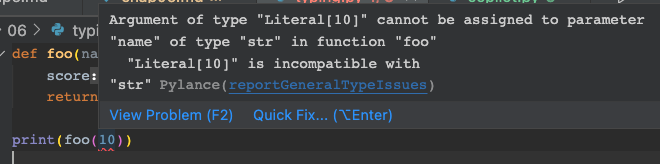
Below, we briefly introduce some common usages of type hints:
# 声明变量的类型
age: int = 1
# 声明变量类型时,并非一定要初始化它
child: bool
# 如果一个变量可以是任何类型,也最好声明它为 ANY。ZEN OF PYTHON: EXPLICIT IS BETTER THAN IMPLICIT
dummy: Any = 1
dummy = "hello"
# 如果一个变量可以是多种类型,可以使用 UNION
dx: Union[int, str]
# 从 PYTHON 3.10 起,也可以使用下面的语法
dx: int | str
# 如果一个变量可以为 NONE, 可以使用 OPTIONAL
dy: Optional[int]
# 对 PYTHON BUILTIN 类型,可以直接使用类型的名字,比如 INT, FLOAT, BOOL, STR, BYTES 等。
x: int = 1
y: float = 1.0
z: bytes = b"test"
# 对 COLLECTIONS 类型,如果是 PYTHON 3.9 以上类型,仍然直接使用其名字:
h: list[int] = [1]
i: dict[str, int] = {"a": 1}
j: tuple[int, str] = (1, "a")
k: set[int] = {1}
# 注意上面的 LIST[], DICT[] 这样的表达方式。如果我们使用 LIST(),则这将变成一个函数调用,而不是类型声明。
# 但如果是 PYTHON 3.8 及以下版本,需要使用 TYPING 模块中的类型:
from typing import List, Set, Dict, Tuple
h: List[int] = [1]
i: Dict[str, int] = {"a": 1}
j: Tuple[int, str] = (1, "a")
k: Set[int] = {1}
# 如果你要写一些 DECORATOR,或者是公共库的作者,则可能会常用到下面这些类型
from typing import Callable, Generator, Coroutine, Awaitable, AsyncIterable, AsyncIterator
def foo(x:int)->str:
return str(x)
# CALLABLE 语法中,第一个参数为函数的参数类型,因此它是一个列表,第二个参数为函数的返回值类型
f: Callable[[int], str] = foo
def bar() -> Generator[int, None, str]:
res = yield
while res:
res = yield round(res)
return 'OK'
g: Generator[int, None, str] = bar
# 我们也可以将上述函数返回值仅仅声明为 ITERATOR:
def bar() -> Iterator[str]:
res = yield
while res:
res = yield round(res)
return 'OK'
def op() -> Awaitable[str]:
if cond:
return spam(42)
else:
return asyncio.Future(...)
h: Awaitable[str] = op()
# 上述针对变量的类型定义,也一样可以用在函数的参数及返回值类型声明上,比如:
def stringify(num: int) -> str:
return str(num)
# 如果函数没有返回值,请声明为返回 NONE
def show(value: str) -> None:
print(value)
# 你可以给原有类型起一个别名
Url = str
def retry(url: Url, retry_count: int) ->None:
pass
Additionally, type hints support some advanced usages, such as TypeVar, Generics, Covariance, and Contravariance, etc. These concepts are defined in PEP484. Additionally, PEP483 and Understanding Typing can help readers better understand type hints. Interested readers are advised to study them in depth.
If your code is fully equipped with type hints, the IDE can basically provide refactoring capabilities similar to strongly typed languages. It is important to emphasize that before refactoring, you should first perform unit testing, code linting, and formatting. Only after there are no errors should you proceed with refactoring. In this way, if the unit tests still pass after refactoring, it basically indicates that the refactoring was successful.
3. PEP8 - Python Code Style Guide
PEP8 is a proposal regarding Python code style drafted by Guido and others in 2001. The purpose of PEP8 is to improve the readability of Python code and ensure a consistent style among different developers. The content of PEP8 includes: code layout, naming conventions, code comments, coding standards, etc. PEP8’s content is extensive; in practice, we do not need to memorize its rules specifically. As long as we use the correct code formatting tool, the final presented code will definitely comply with PEP8 standards. In the following section, we will introduce this tool—Black—so we do not intend to dwell on it here.
4. Lint Tools
Lint tools perform logical checks and style checks on code. Logical checks refer to things like using undefined variables, defined but unused variables, not passing parameters according to type hint conventions, etc.; style checks refer to variable naming styles, whitespace, blank lines, etc.
The Python community has many Lint tools, such as Plint, PyFlakes, pycodestyle, bandit, Mypy, etc. Additionally, there are tools like Flake8 and Pylama that combine these tools.
When selecting a Lint tool, important metrics are the completeness of error reporting and speed. Overly comprehensive error reporting is not always the best; sometimes it draws your energy into meaningless troubleshooting—purely static analysis-based error checking can inevitably produce false positives; it also slows down execution speed.
4.1. Flake8
ppw selected Flake8 and Mypy as Lint tools. Flake8 is actually a combination of a group of Lint tools, composed of pycodestyle, pyflakes, and mccabe.
4.1.1. pycodestyle
pycodestyle is used to check whether code style (spaces, indentation, line breaks, variable names, single/double quotes in strings, etc.) complies with PEP8 standards.
4.1.2. pyflakes
pyflakes is used to check for syntax errors, such as defined but unused local variables, variable redefinition errors, unused imports, formatting errors, etc. People usually contrast it with pylint. Compared to pylint, pyflakes can detect fewer syntax errors, but it has a lower false positive rate and is faster. Under the condition of sufficient unit testing, we recommend beginners to use pyflakes.
Below is an example where pylint reports an error, but pyflakes does not:
def add(x, y):
print(x + y)
value: None = add(10, 10)Obviously, the code author forgot to add a return statement to the add function, so the result of assigning value = add(10, 10) is None. pylint will report an error, but pyflakes will not.
However, pylint has a certain false positive rate. The result of submitting the above code to pylint for syntax checking is:
xxxx:1:0: C0114: Missing module docstring (missing-module-docstring)
xxxx:1:0: C0116: Missing function or method docstring (missing-function-docstring)
xxxx:1:8: C0103: Argument name "x" doesn't conform to snake_case naming style (invalid-name)
xxxx:1:11: C0103: Argument name "y" doesn't conform to snake_case naming style (invalid-name)
xxxx:5:0: E1111: Assigning result of a function call, where the function has no return (assignment-from-no-return)
xxxx:5:0: C0103: Constant name "value" doesn't conform to UPPER_CASE naming style (invalid-name)The reports for lines 1, 2, and 5 are correct here. But it is hard to say whether the reports for lines 3 and 4 are correct. For the sake of code simplicity, it is very common to use single letters as local variables. The PEP8 specification only requires us not to use "l" (lowercase L), "O" (uppercase O, hard to distinguish from number 0), and "I" (uppercase I).
The report for the last line is obviously wrong. The error that the function add has no return value causes pylint to mistakenly assume value is a constant rather than a variable. In fact, when you fix the error of add not returning a value, pylint will not report this error.
This is why we recommend beginners use pyflakes instead of pylint. Beginners can easily drown in the large number of errors and false positives thrown by pylint, spending a lot of time resolving these false positives while being at a loss. Additionally, pylint’s overly strict error checking might make beginners who have not yet formed good programming habits feel frustrated. For example, the error report regarding missing documentation, although correct, would make the learning curve too steep for beginners to reach all these standards at once, thereby reducing their enthusiasm for learning.
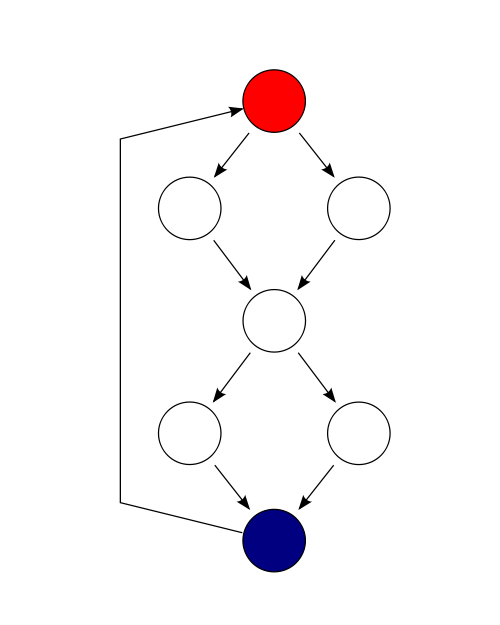
mccabe is used to check code complexity. It processes code into a graph according to control flow, so code complexity can be calculated using the following formula: $M = E - N + P$, where E is the number of paths, N is the number of nodes, and P is the number of decisions.
Taking the following code as an example:
if (c1())
f1();
else
f2();
if (c2())
f3();
else
f4();The corresponding control flow graph can be drawn as:
 {height="30%"}
In the above control flow graph, there are 9 edges, 7 nodes, and 1 connection, so its complexity is 3.
4.1.3. mccabe
mccabe is named after Thomas J. McCabe, who published the paper "A Complexity Measure" in IEEE in 1976. This important article has been cited by other academic papers over 8,000 times and is considered one of the most important and influential papers in the software industry, influencing a generation. 33 years later, Thomas J. McCabe was awarded the Most Influential Paper Award by ACM in 2019. This award is given only once a year, and only papers from 11 years prior to the award year are eligible. To date, only 15 editions have been awarded, with about 40 people receiving this award.
Tom McCabe proposed that if this complexity is below 10, the code segment is just a simple process with low risk; 11-20 is medium risk; 21-50 is high risk and high complexity; if greater than 50, the code segment is untestable and has very high risk.
4.1.4. Flake8 Configuration
To configure Flake8, you can place a .flake8 file in the root directory. Although configurations can be integrated into the pyproject.toml file, in most cases, we recommend using separate configuration files to reduce the complexity of pyproject.toml. We hold the same attitude towards configuration files for other tools mentioned later.
.flake8 is an ini-format file. Below is an example:
[flake8]
# REQUIRED BY BLACK, HTTPS://GITHUB.COM/PSF/BLACK/BLOB/MASTER/.FLAKE8
max-line-length = 88
max-complexity = 18
ignore = E203, E266, E501, W503, F403, F401
select = B,C,E,F,W,T4,B9
docstring-convention=google
per-file-ignores =
__init__.py:F401
exclude =
.git,
__pycache__,
setup.py,
build,
dist,
releases,
.venv,
.tox,
.mypy_cache,
.pytest_cache,
.vscode,
.github,
docs/conf.py,
testsWe exclude linting for test files, which is also recommended by Flake8 developers. Although code readability is very important, we should not spend too much valuable time on the style of test code. The initial few lines of configuration here are to be compatible with Black. If not configured this way, Flake8 will always report errors for files formatted by Black, and such errors are meaningless.
4.2. Mypy
Flake8 undertakes the work of code style, partial syntax errors, and code complexity checks. However, it does not handle errors related to type checking; this work we can only leave to Mypy to complete.
The ppw project has already integrated the Mypy module and will automatically perform type checking when running tox. It seems that as long as we follow PEP484 and several related PEPs to do type annotations well, and then simply run Mypy, everything should be fine? However, practice is always richer and deeper than theory. When Mypy runs checks, it often encounters situations where third-party libraries do not yet support type annotations, or due to configuration errors, Mypy does not get the expected results. When encountering these problems, we need to understand Mypy’s working principles and configure Mypy to allow it to work better.
Info
Why did ppw choose Mypy? If you use VS Code for programming, you have likely already used Pyright as the type checker. This is because the type checking errors given by Pylance all come from Pyright. So why does ppw still recommend another type checker?This is because Pyright is not a pure Python solution. To install Pyright, you must also install Node.js. In the development environment, Node.js generally only needs to be installed once, and when installing VS Code, Node is also automatically installed. However, in a matrix testing environment driven by tox, any non-pure-Python solution may bring additional complexity.
The difficulty lies in that the specification of Any types does not necessarily come from explicit declarations in our own code (for this part, we can modify it ourselves, using Any carefully only when absolutely necessary). In Mypy, it is also automatically obtained and propagated. Mypy’s rule is that local variables within a function body, if they are not explicitly declared as a certain type, regardless of whether they are assigned initial values, Mypy will derive them as Any. For variables outside the function body, Mypy will derive their type based on their initial values. The reason Mypy handles this way may be because it cannot truly run this function during checking.
Let’s first look at an example of variables inside a function body automatically obtaining the Any type:
def bar(name):
x = 1
# REVEAL_TYPE 是 MYPY 的一个调试方法,用以揭示某个变量的类型。它仅在 MYPY 检查时才会有定义,并会打印出变量类型。你需要在调试完成后,手动移除这些代码,否则会引起 PYTHON 报告 NAMEERROR 错误。
reveal_type(x)
x.foo()
return nameWe save the above code as test.py and then run checks via Mypy. We will get the following output:
test.py:12: note: Revealed type is "Any"Apart from this, there are no other errors. In the above code, although x is assigned the integer 1, its type is still derived by Mypy as Any. Therefore, we can call any method on x without causing Mypy’s error prompts.
The following example reveals how Mypy derives the types of variables outside the function body:
from typing import Any
s = 1 # Statically typed (type int)
reveal_type(s) # output: Revealed type is "builtins.int"
d: Any = 1 # Dynamically typed (type Any)
reveal_type(d) # output: Revealed type is "Any"
s = 'x' # Type check error
d = 'x' # OKOther situations that obtain the Any type also include import errors. When Mypy encounters an import statement, it will first try to locate the module or its type stub file in the file system. Then Mypy will perform type checking on the imported module. However, there may be cases where the imported library does not exist (e.g., name error, not installed in the environment where Mypy runs), or the library has no type annotation information. In such cases, Mypy will derive the type of the imported module as Any.
Info
Note that in Chapter 4, in the boilerplate project we generated, there exists an empty file named `py.typed` under the `sample\sample` directory. This file will be copied into the packaged package during the Poetry packaging process. The purpose of this file is to tell the type checker (type checker) that the modules in this package have type annotations and can undergo type checking. If your package does not have this file, the type checker will not perform type checking on your package.py.typed is not an invention of Mypy but a regulation of PEP 561. All type checkers should follow this regulation.
- The
MYPYPATHenvironment variable (a list of directories, separated by colons on UNIX systems, and by semicolons on Windows). - The
mypy_pathconfiguration item in the configuration file. - The directory of the source given in the command line.
- Marked type-checking-safe installed packages (see PEP561).
- Related directories of the typeshed repo.
Secondly, besides regular Python files and packages, Mypy also searches for stub files. The rules for searching the module foo are as follows:
- Search each directory in the search path (see above) until a match is found.
- If a package named
foois found (i.e., a directory containing__init__.pyor__init__.pyifiles), it matches. - If a stub file named
foo.pyiis found, it matches. - If a Python module named
foo.pyis found, it matches.

The rules are somewhat complex, but generally, we only need a rough understanding. When encountering problems, we can resolve them by consulting Mypy’s documentation How to Find Imports. In short, we need to understand that if an imported library cannot be found after the above search, Mypy will derive the type of that module as Any.
In addition to the above situations where Any is obtained, Mypy will also automatically propagate the Any type to other variables. For example, if a variable’s type is Any, then any of its attributes’ types will also be Any, and any call to a type of Any will also obtain the Any type. Please see the following example:
def f(x: Any) -> None:
# X 具有 ANY 类型,FOO 是 X 的一个属性,所以 X.FOO 的类型也是`ANY`
# 既然 X.FOO 的类型是`ANY`,那么对 X.FOO 的调用,也将导致 MYPY 将 Y 的类型推导为`ANY`
y = x.foo()
y.bar() # 因此,mypy 会认为这个调用是合法的From PEP 484 starting to construct Python’s type hint building, until PEP 563 basically completed the topping of the building, there were still a large number of third-party libraries that did not support type annotations. In response to this reality, Python’s type annotations are progressive (see PEP 483). Any type checker must face this reality and provide solutions.
Mypy provides a large number of configuration items to solve this problem. These configuration items can be passed via command-line arguments or via configuration files.
By default, Mypy uses mypy.ini in the project directory as its configuration file; if this file is not found, it will sequentially look for .mypy.ini (note the extra '.' at the front), pyproject.toml, setup.cfg, $XDG_CONFIG_HOME/mypy/config, \~/.config/mypy/config, and finally ~/.mypy.ini.
A typical Mypy configuration file includes global configurations and settings for specific modules or libraries, with an example as follows:
[mypy]
warn_redundant_casts = true
warn_unused_ignores = true
warn_unused_configs = true
disallow_any_unimported = true
ignore_missing_imports = false
# 禁止未注解的函数、或者注解不完全的函数。
disallow_untyped_defs = true
# 当 DISALLOW_UNTYPED_DEFS 为真时,下面的配置无意义
#DISALLOW_INCOMPLETE_DEFS = TRUE
disallow_untyped_calls = true
disallow_untyped_decorators = true
# 不允许使用`X: LIST[ANY]` 或者 X: LIST`
disallow_any_generics = true
# 显示错误代码
show_error_codes = true
# 如果函数返回值声明不为 ANY,但实际返回 ANY,则发出警告
warn_return_any = true
[mypy-fire]
# CLI.PY 中引入了 PYTHON-FIRE 库,但它没有 PY.TYPED 文件,这里我们要对该库单独设置允许导入缺失
ignore_missing_imports = true
The configuration items given in the example are those we consider relatively important and different from the default values. For all Mypy configuration items and their meanings, please refer to the official documentation. These configuration items can be set via configuration files or passed directly to Mypy via command line. Of course, when passed via command line, these configurations will take effect globally.
Below, we will appropriately expand on some configuration items in the example.
4.2.1. disallow_untyped_defs
By default, Mypy’s type checking is quite loose to be compatible with some legacy projects. If we want stricter type checking, we can set disallow_untyped_defs to true. We can test this:
def bar(name):
return nameThe function bar has no type annotations added; obviously, it should not pass Mypy’s type checking. But if we execute it under the command line:
$ mypy test.pyMypy will not give any error prompts. If we bring the --disallow-untyped-defs parameter:
$ mypy --disallow-untyped-defs test.pyThis will prompt the following error:
test.py:7: error: Function is missing a type annotation [no-untyped-def]If setting disallow_untyped_defs via a configuration file, for such boolean values, setting them to true or false is sufficient. Passing parameters via the command line will definitely take effect globally, whereas via configuration files, configuration can be performed at a finer granularity.
4.2.2. allow_incomplete_defs
In the above configuration, there is also an option named allow_incomplete_defs, which targets situations where function parameters are only partially annotated. Sometimes we need to allow this situation to occur. At this time, we need Mypy to configure the following only for individual occasions:
[mypy-special_module]
disallow_untyped_defs = false
allow_incomplete_defs = true4.2.3. check_untyped_defs
In the following code, we add a string to an integer. This is obviously unreasonable.
def bar()->None:
not_very_wise = "1" + 1If there is a global setting disallow_untyped_defs = True. In this case, Mypy will report the following error:
error: Unsupported operand types for + ("str" and "int") [operator]But there are exceptions to everything. In exceptional cases, we can also settle for the second best by setting check_untyped_defs = True to detect the above problem.
4.2.4. disallow_any_unimported and ignore_missing_imports
We introduced earlier that if Mypy cannot track an imported library, it will infer the type of that module as Any, thereby further propagating into our code, making more type checks unable to proceed. If we want to prohibit this situation, we can set disallow_any_unimported to True. The default value of this parameter is false.
Generally, we should set disallow_any_unimported to True on a global scale, and then resolve one by one the errors reported by Mypy regarding unprocessable imports. In projects generated by ppw, if we choose fire as the command-line tool, we will encounter the following error:
error: Skipping analyzing 'fire': found module but no type hints or library stubs [import]Generally speaking, well-known third-party libraries often have type stub files registered on typeshed, and type checkers (such as Mypy) should be able to find them automatically. For unknown third-party libraries, we can upgrade them to see if the latest version supports it, or search for their stub libraries on PyPI. For example, for fire, if there is a stub library on PyPI, its name must be types-fire, so we can correct the above problem as follows:
$ pip install types-fireBy the time this book was published, the developers of fire had not uploaded stub files. In this case, we can also write a fire.pyi file ourselves and place it in the project’s root directory. Regarding how to write .pyi files, please search for it yourself.
But if we cannot find a suitable stub library, and we do not have time to write a .pyi file, then we can set ignore_missing_imports to True, so Mypy will not report errors. Please refer to lines 24~26 in the configuration file above. However, we should try our best to avoid using this option.
4.2.5. implicit_optional
If there is the following code:
def foo(arg: str = None) -> None:
reveal_type(arg) # Revealed type is "Union[builtins.str, None]"We learn via reveal_type that Mypy derives the type of arg as Optional[str]. This derivation itself is not wrong, but considering the Zen of Python’s requirement, "explicit is better than implicit," we should declare the type of arg as arg: Optional[str]. Starting from 0.980, Mypy defaults implicit_optional to False (i.e., prohibiting such usage), so this option does not appear in our example.
4.2.6. warn_return_any
Generally, we should not let functions return types of Any (if there is truly a case of uncertain types, generics should be used). Therefore, Mypy should check this situation and report it as an error. However, Mypy’s default configuration does not prohibit this behavior; we need to modify it ourselves.
For ease of understanding, we provide the following erroneous code:
from typing import Any
def baz() -> str:
return something_that_returns_any()
def something_that_returns_any() -> Any:
...When warn_return_any = True, Mypy will report the following for the above code:
error: Returning Any from function declared to return "str" [no-any-return]4.2.7. show_error_codes and warn_unused_ignores
When we use type: ignore, we generally still hope that Mypy can report error messages (but will not cause type checking to fail). This can be achieved by setting show_error_codes = True to display error codes. This is very helpful for understanding the reasons for errors.
As code evolves, sometimes type: ignore becomes unnecessary. For example, a third-party library we depend on, with the release of a new version, completes its type annotations. In this case, the type: ignore for it is no longer necessary. Timely cleaning up these outdated settings is a good habit.
4.2.8. Inline Comments
We can also control Mypy’s behavior by adding comments in the code. For example, we can ignore Mypy’s checks by adding # type: ignore in the code. If this comment is added to the first line of the file, it will ignore the checking of the entire file. If added at the end of a line, it will ignore the checking of that line.
Generally, we prefer to specify ignoring a specific error rather than ignoring the entire line check. Its syntax is # type: ignore[<error-code>].
5. Formatter Tools
There are many Formatter tools, but we hardly examined other formatters, choosing Black simply because of its logo:

Unlike other Formatter tools that provide meticulous custom configurations, Black insists on not letting you make any customizations (almost). This makes sense; allowing customization would only lead teams into meaningless arguments, and style has no right or wrong, just habit. We often see people in teams arguing over code styles; in fact, what they are opposing is not a certain style itself, but their colleagues.
Of course, Black still opened a small window, allowing you to define the line break length of code. Black’s recommendation is 88 characters. Some teams change this to 120 characters wide. According to conspiracy theories, the幕后 pushers might be the capital forces producing ultrawide monitors.
In projects generated by ppw, we place Black’s settings in pyproject.toml:
[tool.black]
line-length = 88
include = '\.pyi?$'Another tool worth mentioning is isort. Its role is to format import statements in the code, including sorting, splitting multiple imports on one line into one import per line; always placing import statements before formal code, etc. For projects generated by the ppw wizard, this tool is also out-of-the-box:
[tool.isort]
profile = "black"The configuration here is to prevent isort from conflicting with Black. In fact, the configurations of Flake8, Black, and isort need to be carefully synchronized to avoid conflicts. If conflicts occur temporarily, such a situation will arise: code modified by Tool A is changed back by Tool B, never converging.
It is a pity that there is no good tool in VS Code to automatically remove unused imports. Pycharm can do this. There are open-source tools that can do this, but because they are prone to errors, we do not recommend them here.
In VS Code, Lint tools can check for unused imports, and then you need to manually remove them. Removing unused import is necessary; it can appropriately speed up program startup, reduce memory usage, and avoid side effects brought by imports.
Tips
Importing unfamiliar third-party libraries can be dangerous! Some libraries add executable code to the global scope, so when you import these libraries, this code will be executed.We place pre-commit hooks in this chapter because efficient coding must also be correct coding. Sometimes we feel that domestic companies do not need plans and documents, and there is no need for repeated negotiation and communication between requirements, design, and coding. A single directive comes down, and it is quickly executed. This is considered strong execution ability, a major institutional advantage, but these companies with "strong execution" are often exhausted. If the direction is incorrect, what is the point of being exhausted to death?
pre-commit is a Python package that can be installed via pip:
$ pip install pre-commitAfter pre-commit is installed, it will create a .git/hooks directory in your project directory, containing a pre-commit file. This file is a shell script that will be called when you execute the git commit command. The role of pre-commit hooks is to check the code before you submit it. If there are errors, it will prevent you from submitting the code, thereby ensuring the code repository is not polluted by these erroneous, non-compliant codes.
If you use the wizard to generate a project, the wizard has already installed pre-commit hooks for you. When you run the git commit command, you will see output like this:

It can be seen that pre-commit hooks checked and fixed line breaks, called Black for formatting, and called Flake8 for error checking, reporting misuse of f-strings.
Once an error appears, you must fix it before you can submit again.
In projects generated by ppw, we have already integrated these configurations:
repos:
- repo: https://github.com/Lucas-C/pre-commit-hooks
rev: v1.1.13
hooks:
- id: forbid-crlf
- id: remove-crlf
- id: forbid-tabs
exclude_types: [csv]
- id: remove-tabs
exclude_types: [csv]
- repo: https://github.com/pre-commit/pre-commit-hooks
rev: v4.1.0
hooks:
- id: trailing-whitespace
- id: check-merge-conflict
- id: check-yaml
args: [--unsafe]
- id: end-of-file-fixer
- repo: https://github.com/pre-commit/mirrors-isort
rev: v5.10.1
hooks:
- id: isort
- repo: https://github.com/ambv/black
rev: 22.3.0
hooks:
- id: black
language_version: python3.8
- repo: https://gitlab.com/pycqa/flake8
rev: 3.9.2
hooks:
- id: flake8
additional_dependencies: [flake8-typing-imports==1.10.0]
exclude: ^tests
- repo: local
hooks:
- id: mypy
name: mypy
entry: mypy
exclude: ^tests
language: python
types: [python]
require_serial: true
verbose: trueThe first group consists of out-of-the-box hooks provided by pre-commit. First, it prohibits the use of Windows line breaks and replaces Windows line breaks with Unix/Linux line breaks. The reason for this is that if files use Unix/Linux line breaks, these files can basically be correctly processed by editing software under Windows; the reverse is not true. For example, if you have a Bash or Perl script but use Windows line breaks, it will not be able to run under Unix/Linux.
Secondly, it prohibits the use of the Tab key in files and replaces the Tab key with spaces. Syntactically, as long as Tab keys and spaces are not mixed, both methods are acceptable. However, different editors (especially under Unix/Linux) expand Tab keys to different widths when visually presenting files, making the same file look inconsistent in different editors. If spaces are used, this problem will not occur. Additionally, using only spaces has another benefit: earning more money. According to a survey by Stack Overflow of 28,000 professional developers (excluding students), developers using spaces generally earn 8.6% more than developers using Tab keys. This report was published in Stack Overflow’s blog on June 5, 2017. This is obviously programmer humor; you can take it seriously or not.
It should be noted that not all Tab keys in all files need to be replaced. A typical example is in CSV files, where we may use Tab keys as separators between fields, so they must be preserved. In the above configuration, we have already excluded CSV files.
The second group is still out-of-the-box hooks provided by pre-commit. It first removes extra spaces at the end of lines. Regarding why extra spaces at the end of lines should be removed, PEP8 briefly explains it. Then it checks whether there are files with incomplete merges and checks whether YAML files comply with specifications.
Note that there is an end-of-file-fixer hook here. The role of this hook is to add an empty line containing only a line break at the end of the file. I believe few people truly understand its meaning. In fact, there are many questions on Quora and Stack Overflow regarding this issue, and the answers are inconclusive.
One saying is that in the POSIX standard, the definition of a line of text is a sequence of zero or more non-line-break characters plus a terminating line break. Therefore, if a line of text does not end with a line break, it might be treated as a binary file by various tools. But this does not explain why we need to add an empty line at the end of the file.
The author leans towards this view: this is mainly to cater to people using Unix and Linux. If you open a file with vi and want to add some new content at the end, if the file ends with an empty line, then Ctrl+G can jump directly to the end of the file to start working immediately. Conversely, Ctrl+G can only jump to the beginning of the last line.
Another reason is that if you want to use cat to concatenate several files, if none of the files end with an empty line (with a line break), the last line of the previous file will be mixed with the first line of the next file, rather than occupying separate lines as expected.
Adding an empty line at the end of a file is not an important feature; it is just that almost all tools in the Unix/Linux ecosystem operate this way. We should respect this habit.
Next are configurations for calling third-party tools to implement related functions in pre-commit. We configured isort, Black, Flake8, and Mypy.
Mypy’s configuration is somewhat unique. It did not use a remote repo but used local. Mypy’s official side did not provide integration with pre-commit, so we adopted the method of directly calling the local Mypy command in pre-commit.
The theme of this chapter is efficient coding. We first introduced code auto-completion tools, then discussed how to use syntax checking tools to discover and fix errors early, avoiding bringing these errors into testing or even production environments. In the solutions we introduced, syntax checking unfolds in real-time with your coding and is enforced once when submitting to the code repository. Later, you will also see that when running tests, another check will be performed. Through such layered defense and checks, we help your project avoid major errors.