
How I Built a Complex Quant Project with Augment AI
People often ask: Has anyone really used AI to complete a complex project?
Me!
Throughout this process, I’ve felt the immense power of Augment (and perhaps AI-assisted programming in general). It saved me countless hours. If you’re a female programmer with a full head of hair, you should definitely use it—it can literally save your hair—but for me, that’s no longer a concern.
To resolve the student registration issue for the Kuangti Quant course, I recently experimented with Cursor and Trae, ultimately choosing Augment to complete the project. Of course, I don’t intend to debate whether PHP is the best programming language here; if Augment isn’t your thing, please feel free to try other AI coding tools!
This exhausting yet ultimately rewarding afternoon is what drove me to work overtime and write this article. Augment’s Agent Auto mode emerged as the "Man of the Moment," pulling me out of the mud, allowing me to meet the project deployment deadline, and even leaving me time to write this post.
When I recently interviewed candidates, I showed them this image and asked, "What information can you extract from this?"
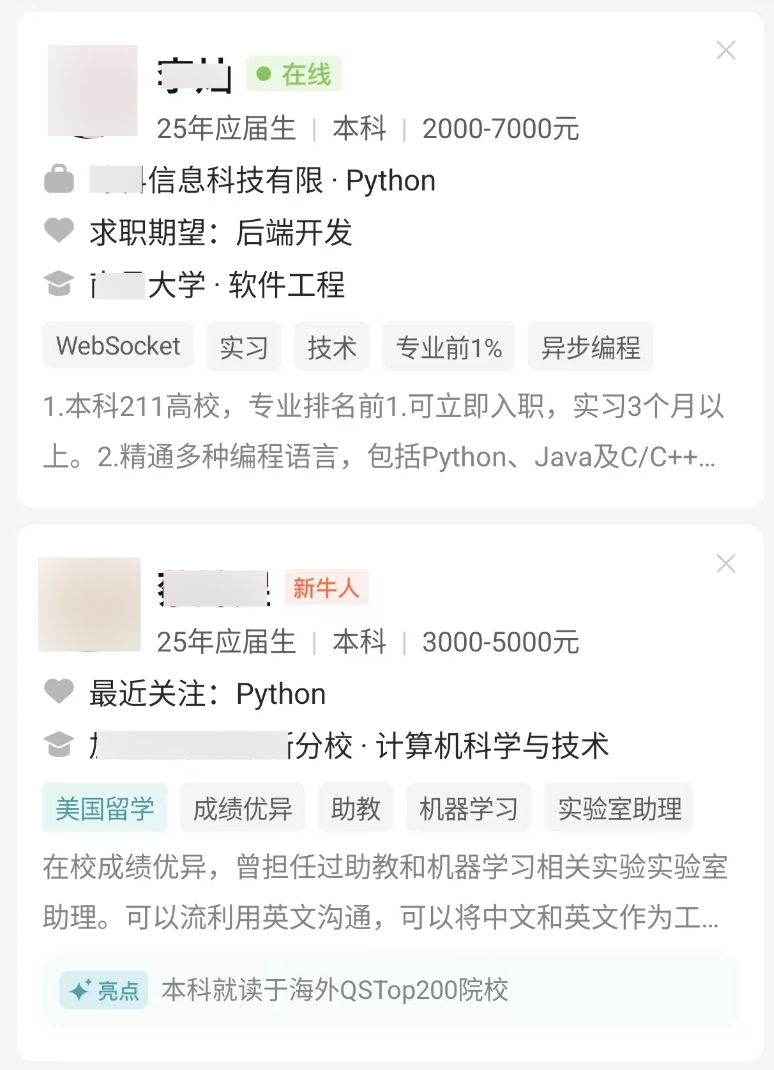
If you were applying for an HR role, you’d obviously prioritize contacting the currently online "New Star" candidate, while also considering role fit. But this is a test of observation and归纳 (induction) skills: What categories of information do these small cards provide?
We need this ability in countless work scenarios. For example, if you’re managing a Xiaohongshu (Little Red Book) account, you often need to quickly identify the "traffic secrets" between two similar notes with vastly different view counts. This requires a keen eye.
Programmers need this skill too. Today, I was caught off guard by a similar challenge. The final issue was identified as the difference shown below:
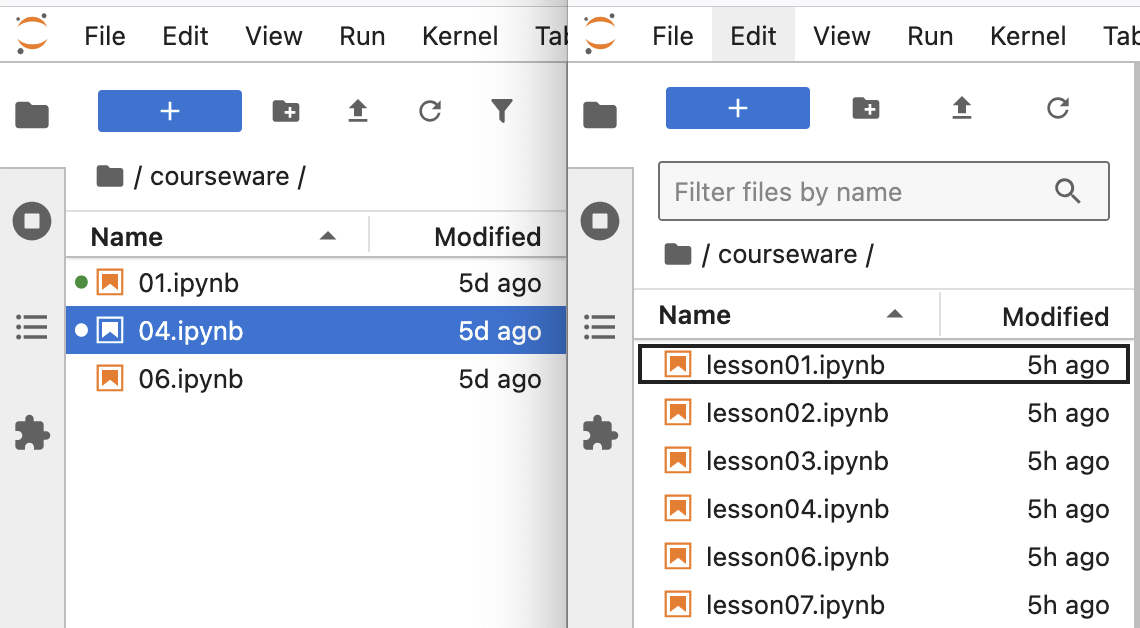
These are the course catalogs for two of our courses. This is a course environment built with JupyterLab. When a user clicks on a specific lesson, the link may or may not open depending on their permissions and purchase duration. The problem now is that on the left, all links that should open do open; on the right, none of them open.
When we placed the two catalogs side by side after finding the root cause, the differences were glaringly obvious. However, in a programming environment, inaccessible links appear like this:
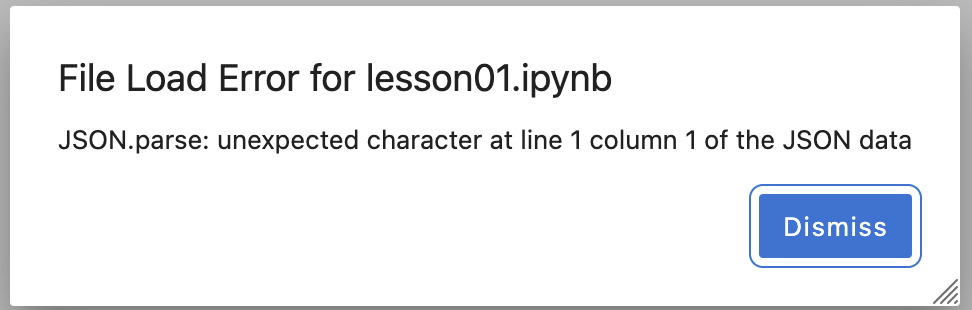
The file is clearly there, with no errors, yet it’s inaccessible. Meanwhile, accessible links throw strange errors to distract you.
To understand why this problem was complex, we must first introduce the system’s architecture and tech stack. This is why we say we built a complex project with Augment. By comparing our project, you’ll see how complex a project can be with current AI capabilities, which will help you decide how much to invest in AI.
System Architecture
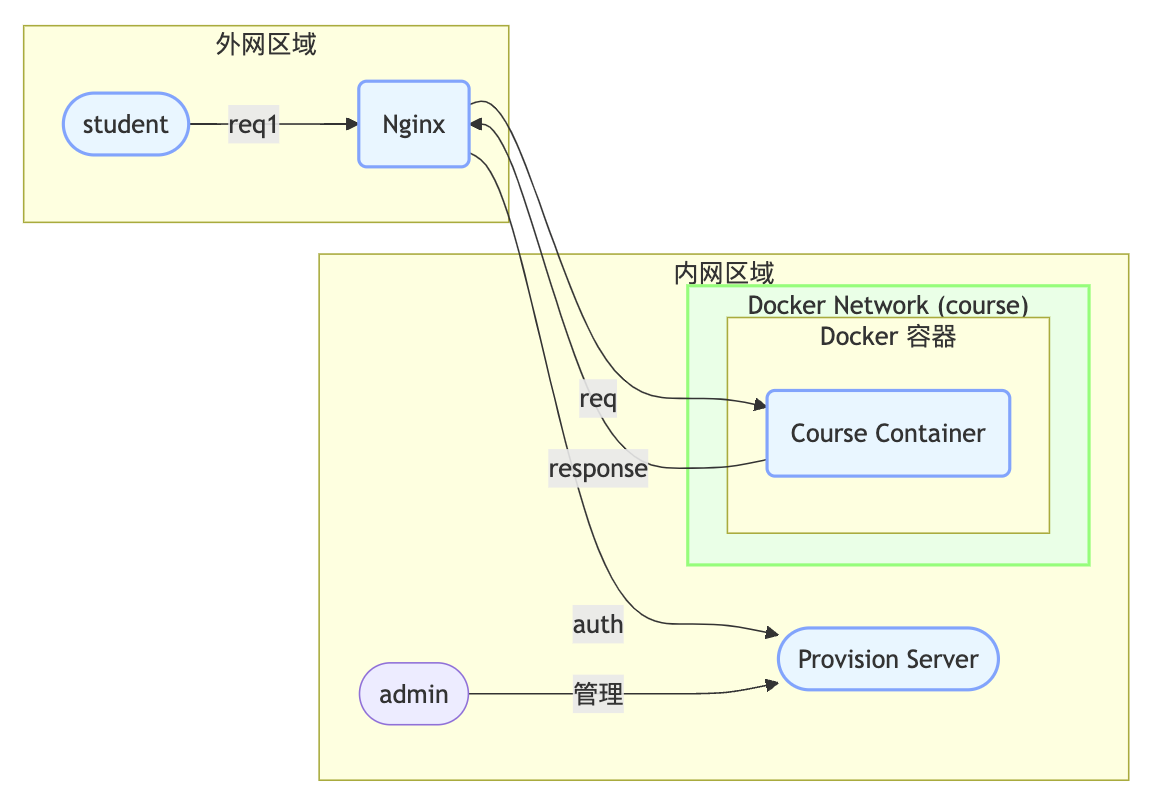
This is a simplified system architecture diagram. Due to AI’s limitations in generating Mermaid diagrams, it differs slightly from our actual architecture:
nginxandcourse containerare on the same Docker network.nginxexposes the host port.nginxmust access theprovision serveron the host. TheProvision serveris deployed only on the host because it needs to create containers for new students.- The system has many
course containers. Whennginxreceives a request likecourseware/01.ipynbfrom the browser, it must dynamically route it to thecourse containercorresponding to each student. This container runs a JupyterLab service. - We used a front-end/back-end separation design with two front-end SPAs: one hosted by
nginxand another by theprovision server. This results in two front-end directories that must reside in the same project as the back-end (Python). This unusual architecture added significant development difficulty. - Actual deployment involves more complex cloud networking details, which I won’t disclose.
To restrict access for non-logged-in users, every request is sent by nginx to the provision server for authentication. Thus, sometimes the "cannot access" image above is normal behavior.
The system’s tech stack and requirements are as follows:
- Front-end built with Vue3 and Vite. The front-end is as responsive as possible.
- Since creating containers can take time, the front-end admin interface uses WebSockets to communicate with the back-end, passing the container build status to the front-end in real-time. Multithreading is also used here.
- A file-based database is sufficient. While SQLite is usually chosen, I’m more familiar with and prefer PostgreSQL syntax, so I used DuckDB.
- The Provision server was built using Blacksheep for its excellent performance and user-friendly interface. However, its community is not as mature as Flask’s. This choice cost me some time—about a day solving how to host SPA programs within Blacksheep itself. There’s also an interesting side story here.
- Blacksheep cannot run independently; it must be launched via Uvicorn. Uvicorn was also immature, contributing a small bug that AI couldn’t resolve, requiring a GitHub search to find a solution. This delayed us by an extra day.
- We used Nginx’s
auth_requestmodule for user authentication. We initially tried OpenLiteSpeed but retreated to the more mature community-supported Nginx. - I developed on Mac and deployed to Ubuntu. On Mac, I used Orbstack to run containers. Together with the official Nginx container, they contributed a bug related to log directory mapping.
Do you think this system is complex? I’d say yes. It uses two programming languages and involves Docker and Nginx rule modifications. In reality, this project required the skills of three engineers: a front-end engineer (Vue.js), a back-end engineer (Python), and a DevOps engineer.
Anyway, this is what I got for my 299 RMB AI programming course:
Completing such a project should only require one front-end developer. It has only two fixed interface layouts and doesn’t even consider PC compatibility.
The Exhausting Afternoon
This afternoon, I was conducting final tests for the new course system launch. The system should work like this: adding a customer:

After adding a user, you can register them for a course to generate a dedicated environment:
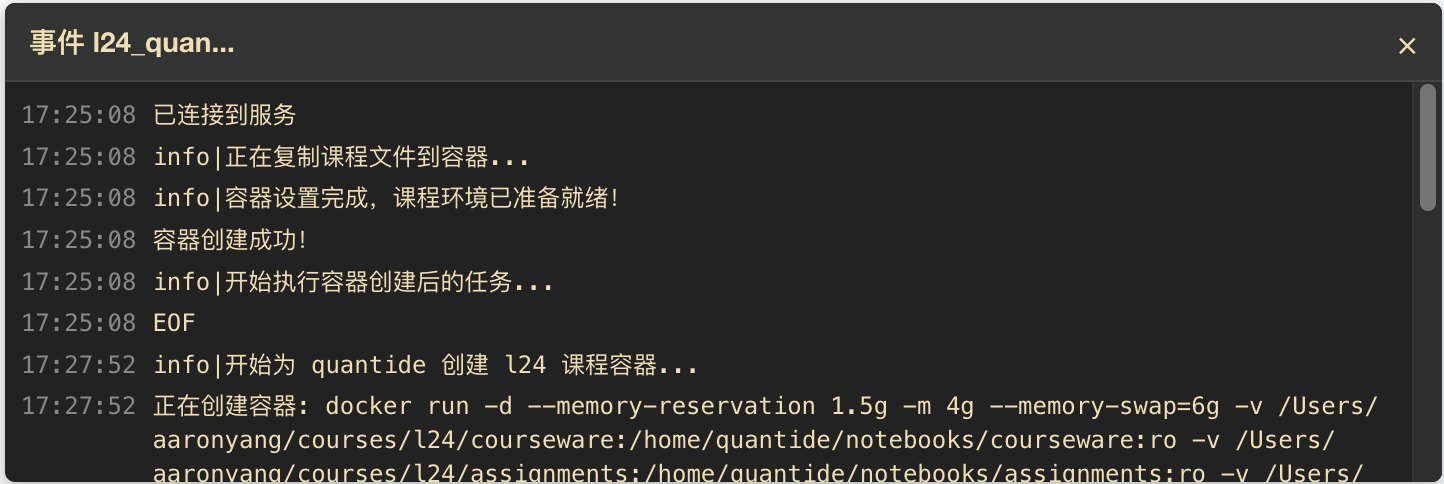
Then, the student can log in via the browser:

After logging in, they can see their enrolled courses:
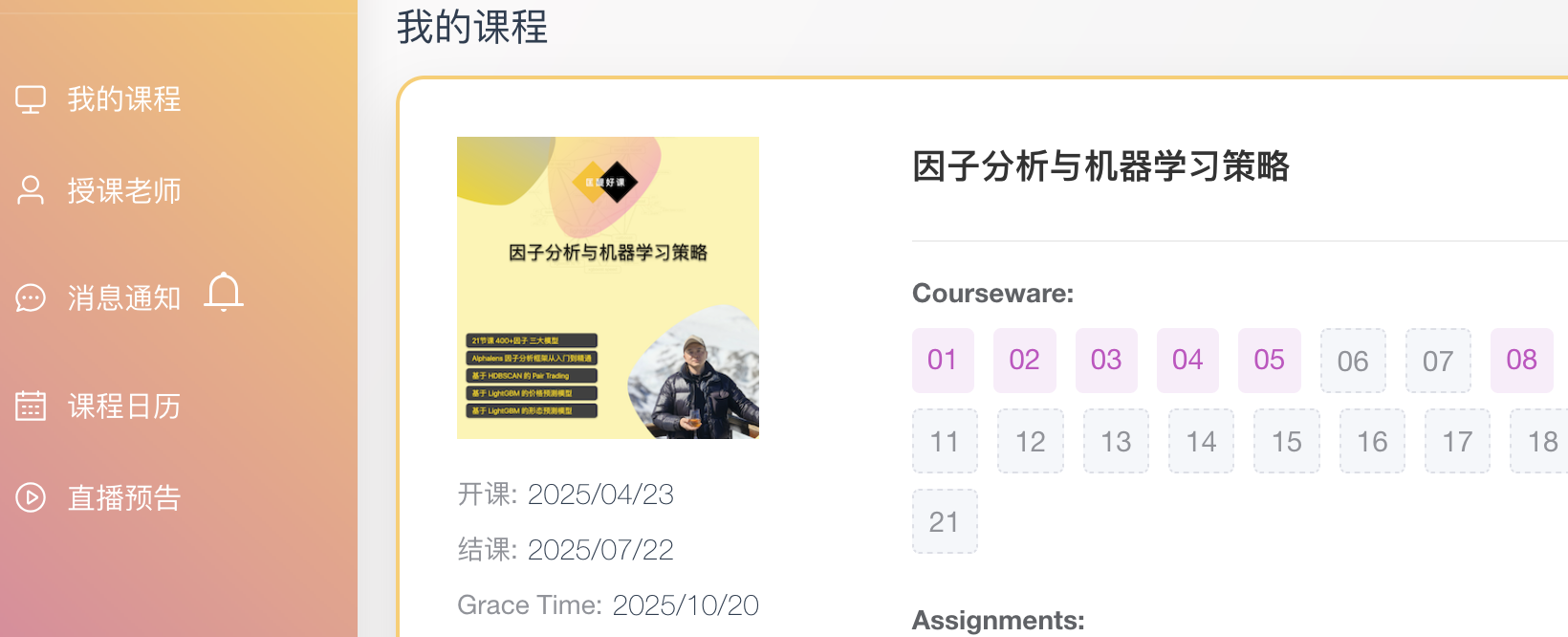
When the user clicks the pink course link, they should see the course content. The course link is:
http://*/course/l24/quantide/lab/tree/courseware/01.ipynbClicking it should open the 01.ipynb notebook, but instead, it returned an "access denied" error, taking me to the Jupyter Lab home interface:
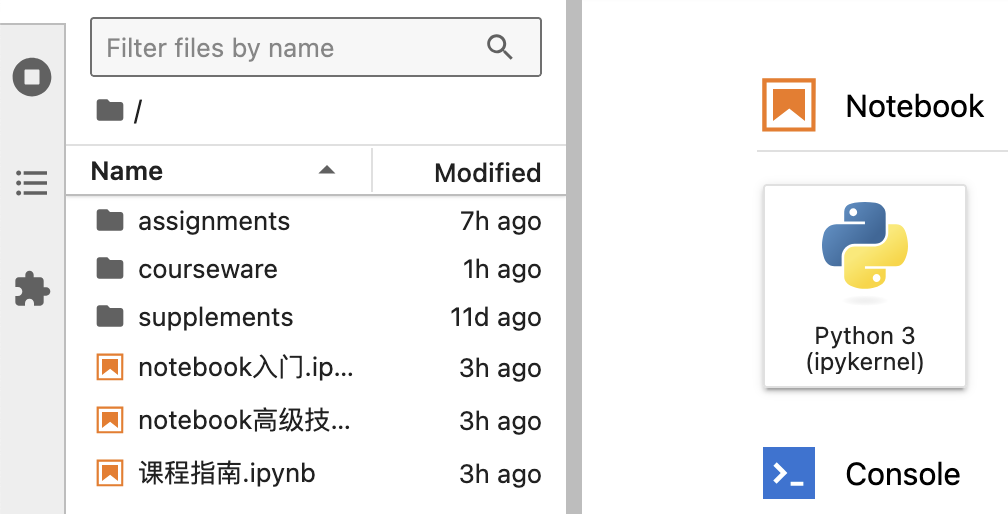
Here, all notebooks are clearly listed, but clicking them still results in "access denied."
Since this issue only exists in the "Quant 24 Lessons" course and not in the "Factor Analysis and Machine Learning Strategy" course, I was certain it was just a deployment and configuration issue. So, I only enabled Augment’s chat mode to help me.
It guided me through the afternoon. We checked if the entrypoint scripts of both containers were identical, if the directory mapping syntax was the same, if jupyter_lab_config was the same, and if the container environment variables were the same. Augment even excitedly shouted multiple times, "I found the problem!"
After countless modifications, restarts, and rollbacks, I realized something: as the question setter, if I looked at this image myself:
Could I instantly see all the differences between the top and bottom cards? Would I fall into some common-sense blind spot? For instance, it’s hard to distinguish "124" from "l24" with the naked eye. Who knows how many such subtle differences exist!
So, I decided to enable Augment’s Agent (Auto) mode. In fact, for most of these days, I’ve been using Agent Auto to help me code.
tip
Augment has three modes: chat, agent, and agent auto. Chat mode can read all code and write/modify code, but it cannot call tools. Agent mode can do what Chat does and can call tools, but requires your approval before calling them. Agent Auto mode is highly efficient; it automatically calls tools until it finally tells you, "Great! I’ve completed this task."attention
In the project we’re working on, there’s an issue: when I click Academy > My Courses > Link for Lesson 24, it shows "cannot access"; but the FA course link works. Both are routed through the same Nginx container; the containers behind Nginx are different: one is `course_l24_quantide`, the other is `course_fa_quantide`.I’m enabling agent mode not to ask you to make changes, but to let you directly run commands to check file and (container) states.
Please start investigating this issue now.
The Agent started in a conventional manner, first responding to my question. But since my question was somewhat vague, its response was simple:
I'll help you investigate why the 24 课 links aren't working while the FA course links are working. Let's start by gathering information about the configuration and status of the relevant components.To be honest, I wasn’t very hopeful.
Next, it read containers.yaml—the configuration file for creating containers.
Then it called docker ps to check which containers were running. It identified the nginx container as critical and thoroughly examined it:
docker exec nginx ls -la /etc/nginx/
docker exec nginx cat /etc/nginx/auth.conf
docker exec nginx cat /var/log/nginx/error.log | tail -n 50
docker exec nginx cat /var/log/nginx/access.log | tail -n 20During the investigation phase, it drew no conclusions and instead proceeded to examine the other two containers:
docker exec course_l24_quantide ls -la /home/quantide/notebooks/courseware
docker exec course_fa_quantide ls -la /home/quantide/notebooks/coursewareIt also investigated whether these containers were connected to the same course network:
docker network inspect courseThen it checked if Jupyter was running in these containers (this action was somewhat unnecessary; if done manually, it would exhaust anyone).
docker exec course_l24_quantide ps aux | grep jupyter
docker exec course_fa_quantide ps aux | grep jupyterThen it checked the notebook filenames:
docker exec course_l24_quantide find /home/quantide/notebooks/courseware -name "*.ipynb" | head -5
docker exec course_fa_quantide find /home/quantide/notebooks/courseware -name "*.ipynb" | head -5All of this was mundane. The next step was where it got smart: it began to suspect a mismatch between the URL and the filename!
curl -s http://*/api/academy/home/1 | python -m json.toolI didn’t quite understand this command at first—truly a coding prodigy.
It then reviewed the filenames again:
docker exec course_l24_quantide find /home/quantide/notebooks/courseware -name "01.ipynb"And then went back to check the links we provided to users:
curl -s "http://*/api/academy/home/1" | grep -o "http://*/course/l24/quantide/lab/tree/courseware/.*ipyMatching so much information is obviously brain-intensive, but Augment, just when humans were exhausted, discovered the root cause:
tip
The link we provided to users is `/courseware/01.ipynb`, but `01.ipynb` does not exist in Lesson 24; instead, `lesson01.ipynb` exists. This is a typical deployment issue. In the Factor Analysis course, all filenames are just numbers, but in Lesson 24, the source files unnecessarily added the "lesson" prefix.Conclusion
I’ve heard many complaints about AI’s weak coding abilities. But after using Augment, I feel the opposite is true; knowing how to use it effectively is more important.
Actually, I started using GitHub Copilot in July 2023. At that time, Copilot could well handle text polishing and generating unit test data, remembering clever code structures for classic algorithms. Later, I used Tongyi Lingma for a long time, and briefly tried Trae (International Version) and Cursor. Using the same Claude 3.7 model, I felt Augment’s capabilities were the strongest (the Augment team believes they use an integrated training version of Claude 3.7 + O1, not just simple Claude 3.7). Additionally, due to its promotional phase, fewer users mean faster response speeds—a significant advantage.
Today, we revealed one of its uses: constraining Augment’s Agent, preventing it from generating code, and instead having it act like a senior expert, diving into various subsystems, shuttling between the host and Docker container networks, to troubleshoot trivial yet critical issues that can’t be resolved without understanding the entire system’s operational principles.
If you think our provision system has a certain level of complexity and practicality, and you’ve struggled with Augment or other AI tools failing to build complex applications, please leave a comment. If many readers feel these experiences are worth sharing, I’ll write another post.