
2026 Quant Infra: SQLite + sqlite-utils for High-Concurrency Trading
Many people (including myself) hold a misconception about SQLite: first, it’s a toy; second, it’s unsuitable for production environments.
In reality, SQLite is an exceptional database. In 2025, it ranked second only to PostgreSQL in popularity and remains the most widely used database globally.

Quantitative traders should use quantitative tools. SQLite is a precise Swiss Army knife: compact, flexible, and powerful, suitable for various applications. However, for quants, there is one scenario where SQLite shines: it requires no installation or configuration, enables Pythonic development, and delivers excellent performance.
This scenario is using SQLite as a transaction database for quantitative programs.
Historically, I used Python’s built-in sqlite3 module to interact with SQLite databases. Recently, however, I discovered the sqlite-utils library, which grants me unprecedented expressiveness in the most concise manner.
Thus, I have decided to feature SQLite/sqlite-utils as the second installment of the 2026 Quant Tech Stack series.
The Performance Silver Bullet: WAL Mode
As a transaction database, it primarily stores order records, trade records, daily positions, and daily asset tables. Among these, order records constitute the largest data volume, as we must log both order submissions and cancellations.
According to new quantitative trading regulations, order submissions should not exceed 300 per second and 20,000 per day. This is not a high-pressure requirement; SQLite can handle it with ease.
More critical than performance pressure is the support for concurrent read/write operations. When an order is submitted, it does not necessarily execute immediately, and we cannot wait indefinitely for its execution. Therefore, execution status is typically notified via callbacks, which are often arranged in other threads.
question
Can multiple processes open the same SQLite database for concurrent read/write operations?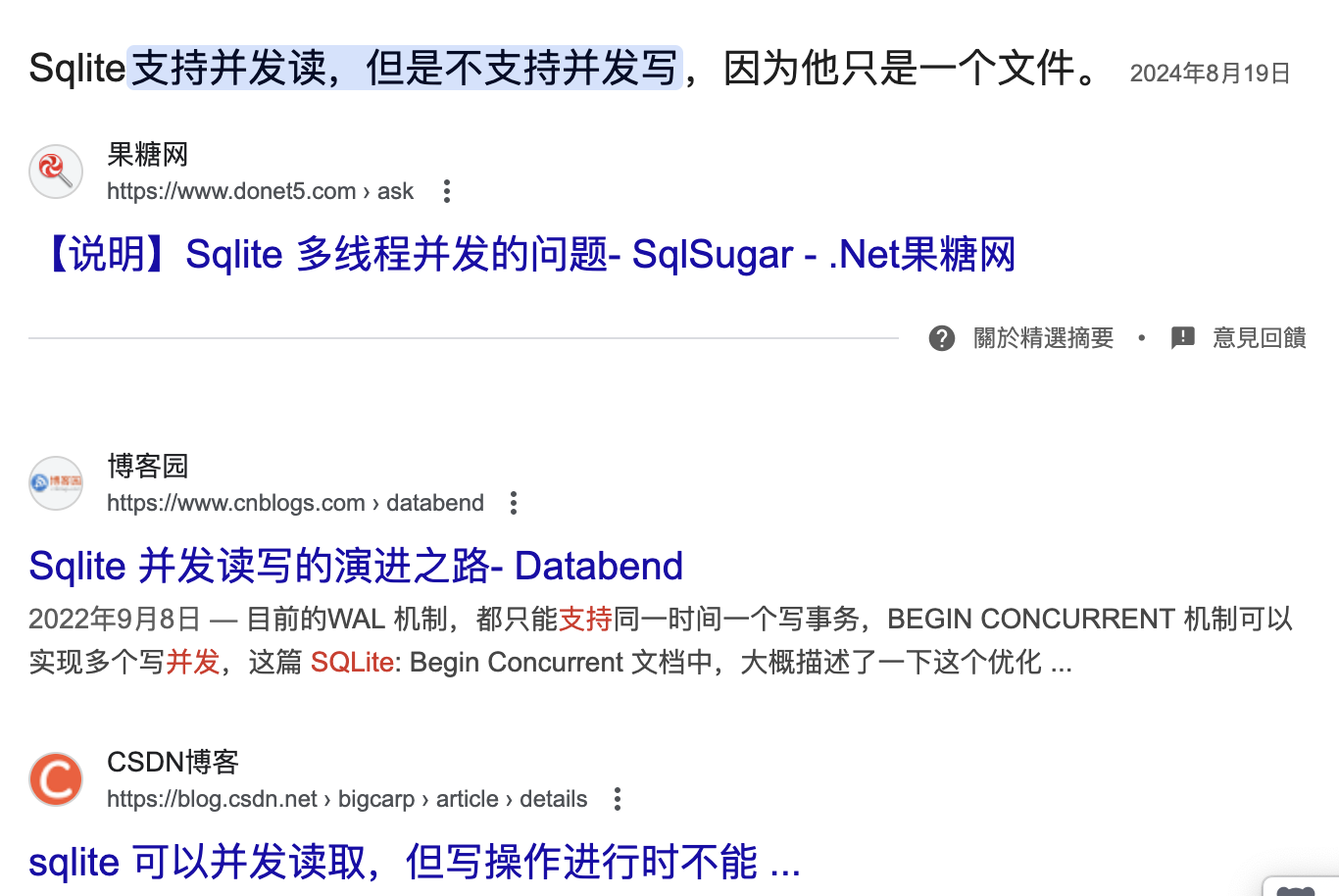
In fact, SQLite has supported multi-process concurrent read/write since 2010, and users do not need to manage locks manually. However, SQLite operates in two modes: "delete" and "wal." The default option has always been "delete" mode, which does not support concurrency, leading many to mistakenly believe that SQLite cannot handle concurrent read/write operations.
Tests and official documentation indicate that enabling WAL mode improves performance in almost all scenarios. Why has SQLite’s default remained "delete" mode? This is because SQLite’s official philosophy has always been to keep it minimalistic—a single-file database. Once WAL mode is enabled, SQLite uses three data files, and the developers worried that some users might find this confusing.
In WAL mode, the other two files are .shm and .wal. SQLite stores lock information in the .shm file—a shared memory file. In WAL mode, reading data involves accessing the stable version from the main database without locking; writing data first locks the .wal file, and only during the final merge is the main database briefly locked.
Therefore, in WAL mode, SQLite’s lock granularity is finer than in "delete" mode. Consequently, even in single-process read/write scenarios, WAL mode offers slightly better performance (approximately 5%).
tip
Lock granularity is a key factor in database performance under concurrent scenarios. PostgreSQL outperforms SQLite in high-concurrency read/write operations because its lock granularity, based on MVCC technology, is much finer.To allow multiple processes to simultaneously read and write to the same SQLite database, you need to enable WAL mode as follows:
import sqlite3
conn = sqlite3.connect(path/to/sqlite.db)
conn.execute("PRAGMA journal_mode = WAL;")Clearly, this is not very Pythonic. If we use sqlite-utils, we can enable WAL mode directly like this:
import sqlite_utils as su
db = su.Database(path/to/sqlite.db)
db.enable_wal()
db.journal_mode # 显示为 'wal'Returning to the previous multi-threaded read/write issue: after enabling WAL mode, SQLite supports concurrent read/write. However, if you share a connection object across threads, you still need to add locking/mutex mechanisms. In this case, we can introduce a thread-local wrapper:
import threading
@singleton
class TradeDB:
def __init__(self):
# 每个线程都有自己的数据库连接
self._thread_local = threading.local()
self.db_path: str = ""
self._initialized = False
def init(self, db_path: str):
if self._initialized:
return def init(self, db_path: str):
if self._initialized:
return
# 初始化数据库连接
self.db_path = db_path
conn = sqlite3.connect(db_path)
db = su.Database(conn)
# 启用 WAL 模式提高并发读性能
if db_path != ":memory:":
db.enable_wal()
# 初始化表结构
self._init_tables(db)
conn.close()
self._initialized = True
@property
def db(self)->su.Database:
"""获取当前线程的数据库连接"""
if not hasattr(self._thread_local, "conn"):
conn = sqlite3.connect(self.db_path, check_same_thread=True)
self._thread_local.conn = conn
self._thread_local.db = su.Database(conn)
return self._thread_local.db def __getitem__(self, table_name) -> su.db.Table:
"""代理获取表对象"""
return self.db[table_name] # type: ignore
db = TradeDB()
db.init(path/to/sqlite.db)
db["users"].insert({"id": 1, "name": "Quantide"})Through this wrapper, we expose a global, unique db object that can be used across multiple threads without locking. This is achieved by using Thread Local Storage (TLS) to maintain an independent database connection for each thread.
We then override the __getitem__ method to proxy table access to the database connection of the current thread, allowing you to perform database operations using methods identical to those documented in the sqlite-utils documentation.
Semi-ORM
In Python, database operations can be performed using native SQL or ORM approaches. Native methods offer high performance but require familiarity with SQL syntax and make refactoring difficult. ORM methods allow database operations using syntax closer to Python. A representative example is SQLAlchemy.
However, SQLAlchemy has its own issues: it is too comprehensive and complex. For simple, exploratory applications, using SQLAlchemy feels cumbersome.
This is why many people choose sqlite-utils. sqlite-utils addresses the following issues:
- It is a semi-ORM, allowing Pythonic database operations without the verbosity of SQLAlchemy.
- SQLite provides only the database engine, lacking data management tools. To inspect tables or data in an SQLite database, you previously had to write code to read them.
sqlite-utilsprovides this capability via CLI.
tip
Another tool for managing SQLite databases involves notebooks combined with the `sqlite-utils` library or `jupysql`. The prerequisite is still enabling WAL mode for the database to share it across multiple processes.# 1. 定义引擎
engine = create_engine('sqlite:///data.db')
Base = declarative_base()
# 2. 定义模型
class Tick(Base):
__tablename__ = 'ticks'
id = Column(Integer, primary_key=True)
symbol = Column(String)
price = Column(Float)
# 如果明天多了个 'volume' 字段,你得改代码,还得做数据库迁移 (Alembic)
# 3. 建表
Base.metadata.create_all(engine)
# 4. 插入
session.add(Tick(symbol='AAPL', price=100.0))
session.commit()Here, types such as Base, Column, String, Float, and Integer are introduced, along with the usage of the magic attribute __tablename__.
In sqlite-utils, however, everything is this simple:
import sqlite_utils as su
db = su.Database(":memory:") # ❶import sqlite_utils as su
db = su.Database(":memory:") # ❶
db["users"].insert_all([{"id": 1, "name": "Fred"},
{"id": 2, "name": "Wilma"}
]) # ❷
print(db.tables) # ❸
print(db["users"].columns) # ❹
list(db["users"].rows) # ❺Simply incredible! You do not need to define table structures to insert data directly!
In the first line, we create an in-memory database and establish a connection. If a filename is passed, a disk-based database file is created.
In the second line, we reference a table that does not yet exist—users—via db["users"], and directly insert two records.
In the third line, we print all tables in the current database; users now exists.
In the fourth line, we print the column fields of the users table, which sqlite-utils automatically determines and creates.
In the fifth line, we print all data in the users table.
sqlite-utils cleverly borrows the syntax of document databases (like MongoDB), making database operations exceptionally simple. This approach may involve adding new fields or changing field definitions. However, if your data belongs in SQLite, the frequency of adding or modifying field definitions is low. So why not skip the tedious table structure definitions and let sqlite-utils handle everything?
tip
You might wonder: if we insert a new object containing "gender" and "age" fields after line 5, how would `sqlite-utils` handle it? Internally, `sqlite-utils` detects the change in table structure and automatically calls the `transform` method to complete the new table structure definition and data migration. See the figure below. 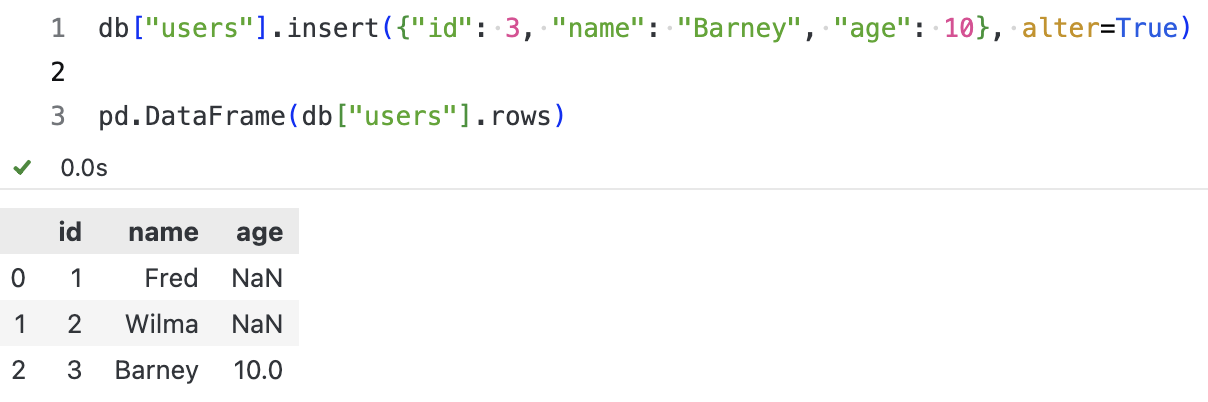Of course, we encourage explicitly defining table structures to improve performance and add data validation capabilities. Besides the pydantic models method introduced in the previous article, if you are already familiar with dataclasses, we can introduce a manual ORM method based on dataclasses that is easier to learn.
Defining Entity-Relationship Mappings with Dataclass
In the sqlite-utils example just demonstrated, we showed how to read data directly from the database without defining table structures. This is convenient for exploratory data analysis.
In practical applications, however, we prefer to explicitly define table structures and add data type validation and conversion capabilities, making the code for upper-layer callers simpler and more consistent. This is where dataclass comes into play.
from dataclasses import dataclass, asdict, fields
import types
import sqlite_utils as su
from enum import IntEnum
import datetimedef _dataclass_to_schema(model) -> dict:
"""类方法:解析当前 dataclass 为 sqlite-utils 兼容的 schema 字典"""
schema = {}
for f in fields(model):
if f.type in (str, int, float, bool):
schema[f.name] = f.type
# 处理所有联合类型(Union[A, B] 和 A | B 语法)
elif (
hasattr(f.type, "__origin__") and f.type.__origin__ is Union
) or isinstance(f.type, types.UnionType):
# 提取非 None 的类型
non_none_types = [t for t in f.type.__args__ if t is not type(None)]
if non_none_types:
base_type = non_none_types[0]
schema[f.name] = (
base_type if base_type in (str, int, float, bool) else str
)
else:
schema[f.name] = str
elif isinstance(f.type, type) and issubclass(f.type, IntEnum):
schema[f.name] = int
else:
schema[f.name] = str
return schemadef create_tables(db: su.Database, model):
"""初始化表结构
在 sqlite_utils 中,创建表结构并非必须;但会导致 sqlite-utils 无法准确判断类型。
"""
table = model.__table__
pk = model.__pk__
t: su.db.Table = db[table] # type: ignore
t.create(_dataclass_to_schema(model), pk=pk)
if model.__indices__ is not None:
indexes, is_unique = model.__indices__
t.create_index(indexes, unique=is_unique)
class Gender(IntEnum):
MALE = 1
FEMALE = 2
@dataclass
class User:
# ❶ 通过魔术字段,为后面创建表提供元数据
__table__ = "users"
__pk__ = "id"
__indices__ = (["name"], False)
id: int
name: str
birth: datetime.date
gender: Gender
def __post_init__(self):
# ❷ sqlite 没有时间类型,时间一般使用字符串存储。
if isinstance(self.birth, str):
self.birth = datetime.date.fromisoformat(self.birth)
# ❸ sqlite 没有枚举类型,整数型枚举一般存为整数,其它枚举类型存为字符串。
if isinstance(self.gender, int):
self.gender = Gender(self.gender)
user = User(id=1, name="Alice", birth=datetime.date(2020, 1, 1), gender=Gender.FEMALE)
db = su.Database(memory=True)
create_tables(db, User) # ❹ 显式创建表格--声明主键、索引等
db["users"].insert(asdict(user))
# 显示刚刚插入的记录 ❺
user_from_db = User(**list(db["users"].rows)[0])
user_from_dbHere are a few tips.
First, we convert type declarations into database fields (unlike SQLAlchemy, which requires explicit declaration). This is very Pythonic. In the _dataclass_to_schema method, we extract the types of all fields from the User class (excluding magic fields). If it is a union type, we find the first non-None type as the field type, then map them to database field types. Of course, due to the limited database field types, most data types are mapped to TEXT.
Second, we use magic fields such as __table__, __pk__, and __indices__ to provide metadata for table creation. This resembles SQLAlchemy, but we only use standard, built-in syntax, making it look much cleaner.
Third, some Python data types are mapped to integer and string types in the database. The data retrieved from the database will also be strings and integers, but they actually correspond to datetime or Enum types. In databases supporting complex data types, the database connection driver handles this conversion automatically.
Neither the built-in sqlite module nor sqlite-utils does this. However, this conversion is very easy to implement ourselves, as shown in comments ❷ and ❸. We achieve this via the __post_init__ method.
In comment ❹, we explicitly create the table, declaring primary keys and indexes. Without this, subsequent insertion statements would fail because sqlite-utils cannot map the Gender type to a database field.
To be continued
---Fourth, when saving a Python object, as long as it is a dataclass class, we can save it using a method like db["users"].insert(asdict(user)). asdict is a method in dataclasses used to convert a dataclass into a dictionary, and sqlite-utils converts the dictionary into a row in the table and inserts it into the database.
Comment ❺ demonstrates a method for reading database records via rows. It is an iterator; to retrieve a specific element, we must first convert it to a list and then access it via indexing. The resulting data is also a dictionary, which can be converted into a User object via User(**dict). During this conversion process, the __post_init__ method is called, converting birth from a database string to a Python date object, and gender from an integer to an Enum type.
This part shares conceptual similarities with the Pydantic section introduced in the previous article of this series, except that this time we use dataclasses paired with sqlite-utils.
In places where built-in syntax can be used, I prefer using only built-in syntax, avoiding third-party libraries. Do not add entities unnecessarily.

SQLite-Utils CRUD Operations
This part is straightforward, explained through the following code example:
db = su.Database(memory=True)
user = User(id=1,
name="Alice",
birth=datetime.date(2020, 1, 1),
gender=Gender.FEMALE)
# 增加一条记录:insert
db["users"].insert(asdict(user))
# 增加记录,如果存在,则进行更新:upsert
db["users"].upsert(asdict(user), pk="id")
# 上述语句相当于:update
db["users"].update(1, {"birth": datetime.date(2020, 1, 20)})
# 通过主键查询刚修改的记录 (get),生日将变为 2020-01-20
db["users"].get(1)
# 返回所有记录:rows
list(db["users"].rows)
# 返回所有记录,转换为 DataFrame。这里 pandas/polars 都支持
pd.DataFrame(db["users"].rows) # ❶
# 按条件查询,使用 rows_where 方法
list(db["users"].rows_where("gender = ?", (Gender.FEMALE,)))
# 当然,我们也可以使用 db.query 方法,显然不如上一种方法简洁
list(db.query("SELECT * FROM users WHERE gender = ?", (Gender.FEMALE,)))
# 按条件删除记录,使用 delete_where 方法
db["users"].delete_where("id = ?", (10,))
# 按 id 删除,使用 delete 方法
db["users"].delete(1)
# 查询数据库中的记录数,此时应该为 0
db["users"].count
# 删除 user 表,使用 drop 方法
db["users"].drop()
# 确认表已删除,使用 tables 属性。此时应该返回空列表
db.tables
Database operations have never been this simple, have they? And with the few lines of ORM mechanism we implemented earlier, we can store objects and have queries return objects.
Additionally, have you noticed that in comment ❶, we converted the query results into a DataFrame? This can also be converted into a Polars DataFrame.
Taking Laziness to the Extreme
Excellent programmers are lazy. They dislike repetitive labor and writing repetitive code. They prefer solving complex problems with simple methods. If you are one of these people, you might be seeking further encapsulation.
For this, Professor Jeremy has brought you fastlite—the new member of the "fast" series. Built on top of sqlite-utils, it introduces dataclass (as we did here) and extends the query syntax:
from fastlite import *
db = database(path/to/db)
# 所有表格的集合
dt = db.t
# 获得表对象 album
album = dt.Album
# 通过 dataclass,将表记录转换为对象
album_dc = album.dataclass()
album_obj = album_dc(**acca_dacca[0])
album_obj
# 表格对象支持以下查询
album(limit = 2) # 返回前两条记录
album(with_pk = 1, limit=2) # 返回前两条记录(对象),并且同时返回主键
album(5) # 返回第 5 条记录(对象)Of course, although fastlite is very intuitive and has a low learning curve, you might want to consider whether you really need it. After all, sqlite-utils already provides sufficiently concise and rich functionality.
Closing Thoughts for 2025
As I write these words, the sandglass of 2025 has only four hours left. The book of 2025 has reached its last page.
In the past two days, news of Manus being acquired by Meta has flooded the internet. Many people still remember the controversy surrounding Manus’s initial release—cryptocurrency, invitation codes, and an unglamorous background.
In our stereotypical view, only elites from prestigious institutions with perfect resumes deserve to define the future of AI. The Manus team is from Wuhan, and its founder graduated from an ordinary 985 university. This "degree determinism" seems even more deeply rooted in the quantitative circle.
Until Manus was acquired by Meta for a staggering $2 billion, and its founder, Xiao Hong, jumped to become Meta’s Vice President. This slap in the face might make us reconsider: Does a degree define ability, or does ability reshape the rules?
Reshaping the rules is also the creator of PyTorch, Soumith Chintala.
If you look at his early resume, Soumith is practically a "counter-example": he attended an ordinary public high school and entered a mediocre "second-tier" university through the Gaokao. When applying for a master’s degree in the US, he was rejected by all 12 schools he applied to.
Without the halo of a prestigious university, he forced his way into CMU for a short-term visit on a J-1 visa, and barely got into NYU as a backup. Even at NYU, despite having AI titan Yann LeCun there, he was not his direct disciple. After graduation, he eagerly submitted his resume to DeepMind. Once, twice, three times—all went unanswered.
Unable to find a job and facing visa expiration, he had to work at an obscure small company as a basic tester to stay in the US.
From 2005 to 2017, this was a long, dark tunnel.
"Second-tier" background, master’s rejections, big tech refusals, visa crises, project cuts... for twelve years, he almost constantly failed. But he held a faint lamp—Torch-7. This was an obscure framework based on Lua. He treated it like a child, refactoring and polishing it day and night.
It was this lamp that ultimately illuminated Soumith’s path. Recommended by Yann LeCun, he entered Meta’s FAIR lab, even though he initially led only a small team of three.
The rest of the story is known to all: in 2017, that small team created PyTorch. It spread like wildfire, becoming the world’s most popular deep learning framework.
In 2025, when someone dug up this "counter-attack history" on Twitter, Soumith simply replied: "All of this is true. But I still owe many people a thank you."
He thanked his advisor Pierre Sermanet for his kindness; he thanked Yann LeCun for his two lifelines when he "could barely see a way out." But more importantly, he thanked the ordinary "passersby."
This reminds me of a story told by Jetsun Pema Rinpoche:
A devout believer went to Wutai Mountain to find Manjushri Bodhisattva. At an inn, he met a drunkard who insisted on drinking with him. The believer firmly refused: "I am here to see the Bodhisattva; how can I break my precepts?"
The drunkard smiled: "If you don’t even drink wine, how can you see the Bodhisattva?"
A few days later, the believer returned empty-handed and disappointed. The drunkard appeared again, asking him to deliver a letter along the way. Reluctantly, the believer kept his promise and delivered it to the address—it turned out to be a pigsty.
He opened the letter and read to the pig: "Vajrayogini, it is time for you to benefit sentient beings; you may leave."
As soon as he spoke, the pig passed away.
It turned out the Bodhisattva had already appeared, but the mortal eye failed to recognize him.
In Soumith’s life, there were also such "mortal Bodhisattvas": his Indian compatriot Praveen, the core engineer who silently wrote the code behind the scenes; his parents, who took on debt but stubbornly supported their son’s dream; and even the stranger Deedy, who took the time on Twitter to compile his story.
The benefactors in our lives often appear as ordinary people, as sentient beings.
Finally, Soumith said: "I believe that everyone who is now 'sitting on success' has struggled behind the scenes. Life is never easy."
At the back cover of 2025, I write these three stories. Ordinary, resilient, and grateful are their footnotes, and also the New Year’s gift I want to give to every quant.
Thank you to everyone who has supported Quantide over the past three years.
Quantitative trading is a lonely practice, but you do not have to walk alone. May we meet more positive, upward, and self-cultivating partners in 2026.
See the world, see sentient beings, and finally see oneself.
Wishing you a long-lasting Alpha in the New Year.