Pandas Series Essentials: Indexing, Alignment, and Ranking
1. Series Fundamentals
This section introduces the basic data manipulation operations for Pandas Series. Subsequent sections will delve deeper into Pandas’ capabilities in data analysis and processing.
1.1. Reindexing
Reindexing is implemented via the reindex() method, allowing users to rearrange or fill a Series according to a new set of index labels. If a label in the new index does not exist in the original Series, it is filled with NaN by default.
| Parameter | Description | Default |
|---|---|---|
| index | List of new index labels; can be an Index instance or other sequence-like data structures. | None |
| method | Method to fill missing values. Options include: 'backfill'/'bfill' (backward fill), 'pad'/'ffill' (forward fill), 'nearest' (nearest value). | None |
| fill_value | Default value to use for filling missing data. | NaN |
| limit | Maximum number of consecutive fills when using a fill method. | None |
| tolerance | Maximum tolerance; values beyond this range are not filled. | None |
| level | If the index is a MultiIndex, specify which level to use for reindexing. | None |
| copy | If True, returns a new copy even if the old and new indices are identical. | True |
Example 1: Basic Reindexing
s = Series([1, 2, 3], index=['a', 'b', 'c'])
# 新的索引
new_index = ['a', 'b', 'c', 'd']
# 重建索引
s_reindexed = s.reindex(new_index, fill_value=0)
print(s_reindexed)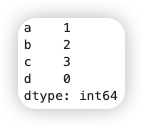
Example 2: Using Fill Methods
For ordered data such as time series, reindexing may require interpolation or filling. The method option serves this purpose; for instance, ffill can be used for forward filling.
# 使用前向填充
s_reindexed = s.reindex(new_index, method='ffill')
print(s_reindexed)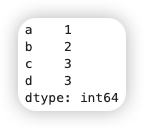
Example 3: Specifying Fill Values
# 指定填充值为 -1
s_reindexed = s.reindex(new_index, fill_value=-1)
print(s_reindexed)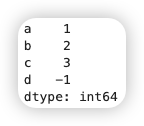
1.2. Dropping Items on a Specific Axis
In Pandas, dropping items from a specific axis in a Series is achieved via the drop() method. Since a Series is a one-dimensional data structure, deletion operations typically target the index (rows).
The drop() method removes specified index labels and returns a new Series, without modifying the original object. Its syntax is as follows:
Series.drop(labels, axis=0, inplace=False, errors='raise')- labels: Index labels to be dropped; can be a single label or a list of labels.
- axis: Axis along which the operation is performed. For Series, this must be 0 (default), indicating row deletion.
- inplace: If True, modifies the object in place and returns None.
- errors: If a specified label does not exist,
raisewill throw an error, whileignorewill suppress the error.
obj = Series(np.arange(5.),index=["a","b","c","d","e"])
print(obj)
new_obj = obj.drop("c")
print(new_obj)
print(obj.drop(["d","c"]))1.3. Indexing, Selection, and Filtering
[Index Selection] Series indexing works similarly to Numpy array indexing, except that Series index values are not limited to integers:
s = Series([10, 20, 30, 40], index=['a', 'b', 'c', 'd'])
print(s['b'])
print(s[['a', 'c']]) # 输出:a 10, c 30Series selection can be achieved through the following methods:
- Basic selection: Using the
[]operator. - Attribute selection: Using the
.operator (only applicable when labels are valid variable names). - iloc and loc: Used for positional indexing and label-based indexing, respectively.
# iloc 选取
print(s.iloc[1]) # 输出:20
# loc 选取
print(s.loc['b']) # 输出:20[Index Filtering] Series filtering can be implemented via the following methods:
- Boolean indexing: Filtering data using boolean conditions.
- Conditional expressions: Filtering combined with conditional expressions.
- isin() method: Filtering values present in a specified list.
- where() and mask() methods: Replacing or retaining data based on conditions.
# 布尔索引
print(s[s > 20]) # 输出:c 30, d 40
# 条件表达式
print(s[s % 20 == 0]) # 输出:b 20, d 40
# isin() 方法
print(s[s.isin([10, 30])]) # 输出:a 10, c 30
# where() 方法
print(s.where(s > 20, -1)) # 输出:a -1, b -1, c 30, d 40
# mask() 方法
print(s.mask(s > 20, -1)) # 输出:a 10, b 20, c -1, d -11.4. Arithmetic Operations and Data Alignment
# 创建两个具有不同索引的 Series
s1 = Series([1, 2, 3], index=['a', 'b', 'c'])
s2 = Series([4, 5, 6], index=['b', 'c', 'd'])
# 自动对齐索引并相加
result = s1 + s2
print(result)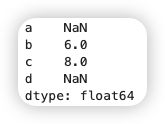
If you have experience with databases, you can consider this similar to a join operation.
To avoid obtaining NaN, you can specify a default value using the fill_value parameter to fill missing indices:
result = s1.add(s2, fill_value=0)
print(result)Notes
Pandas’ `isnull` and `notnull` functions can be used to detect missing data. Feel free to experiment![Sorting by Index]
The sort_index() method is used to sort the Series index. By default, the index is sorted in ascending order.
s = Series([4, 1, 2, 3], index=['d', 'a', 'c', 'b'])
# 按索引升序排序
print(s.sort_index()) # 输出:a 1, b 3, c 2, d 4
# 按索引降序排序
print(s.sort_index(ascending=False)) # 输出:d 4, c 2, b 3, a 1Parameters:
- ascending: Whether to sort in ascending order; default is True.
- inplace: Whether to modify the object in place; default is False.
[Sorting by Values]
The sort_values() method is used to sort the Series values. By default, values are sorted in ascending order.
# 按值升序排序
print(s.sort_values()) # 输出:a 1, c 2, b 3, d 4
# 按值降序排序
print(s.sort_values(ascending=False)) # 输出:d 4, b 3, c 2, a 1Parameters:
- ascending: Whether to sort in ascending order; default is True.
- inplace: Whether to modify the object in place; default is False.
- na_position: Position of missing values; default is 'last' (placed at the end).
[Ranking]
Series ranking is implemented via the rank() method, which assigns a rank to each value and supports various ranking methods.
s = Series([7, -5, 7, 4, 2, 0, 4])
# 默认排名(平均排名)
print(s.rank()) # 输出:0 6.5, 1 1.0, 2 6.5, 3 4.5, 4 3.0, 5 2.0, 6 4.5
# 最小排名
print(s.rank(method='min')) # 输出:0 6.0, 1 1.0, 2 6.0, 3 4.0, 4 3.0, 5 2.0, 6 4.0
# 最大排名
print(s.rank(method='max')) # 输出:0 7.0, 1 1.0, 2 7.0, 3 5.0, 4 3.0, 5 2.0, 6 5.0
# 按出现顺序排名
print(s.rank(method='first')) # 输出:0 6.0, 1 1.0, 2 7.0, 3 4.0, 4 3.0, 5 2.0, 6 5.0Parameters:
- method: Ranking method. Options include:
- 'average' (default): Average rank for identical values.
- 'min': Minimum rank for identical values.
- 'max': Maximum rank for identical values.
- 'first': Rank based on the order of appearance for identical values.
- 'dense': Same rank for identical values, with no gaps in ranks.
- ascending: Whether to rank in ascending order; default is True.
- na_option: Handling of missing values. Options include 'keep' (retain), 'top' (place at the beginning), 'bottom' (place at the end).
1.6. Axis Indexing with Duplicate Labels
Up to this point, almost all examples have had unique axis labels (index values). While many Pandas functions (such as reindex) require unique labels, this is not mandatory. Observe the following Series with duplicate index values:
obj = Series(np.arange(5),index=["a","a","b","b","c"])
obj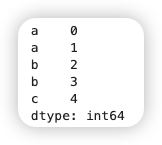
The is_unique attribute of the index indicates whether the index values are unique:
obj.index.is_unique # FalseFor indices with duplicate values, data selection operations behave differently. If a label corresponds to multiple items, a Series is returned; if it corresponds to a single item, a scalar value is returned:
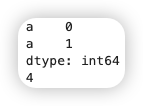
print(obj["a"])
print(obj["c"])