
East Money Quant Interface: Installation & Config Guide
Table of Contents
- 1.1. Installation
- 1.2. Requesting Permissions
- 1.3. Simulation and Testing
- 1.4. Operation and Maintenance
- 2.1. Client Requests
- 2.2. Return Results
- 2.3. Asset Table
- 2.4. Position Table
- 2.5. Limit Buy
- 2.6. Market Buy
- 2.7. Limit Sell
- 2.8. Market Sell
- 2.9. Cancel Order
- 2.10. Query Today’s Orders
- Matching Configuration Rules
- Contact Information
1. Installation and Configuration
1.1. Installation
On a Windows machine, install https://emt.eastmoneysec.com/down. Download and install the second software listed:
Install conda on the same machine. We recommend installing miniconda and creating a virtual runtime environment (Python version 3.8):
conda create -n gmclient python=3.8Install gmadaptor:
pip install gmadaptor-1.1.3-py3-none-any.whl
1.2. Requesting Permissions
Join the East Money Quantitative Simulation Group: 971584613, and contact the administrator to request live trading permissions. Please review the pinned files in the group first. The primary threshold for approval is an initial capital requirement of 1 million RMB. You can withdraw funds after approval.
1.3. Simulation and Testing
While waiting for live trading permissions to be approved, you can open a simulation account at https://emt.18.cn/apply/test-apply-client to debug your program and configuration.
After applying, record your standard capital account number and password, as shown below:

In the login interface, select "Simulation Trading":
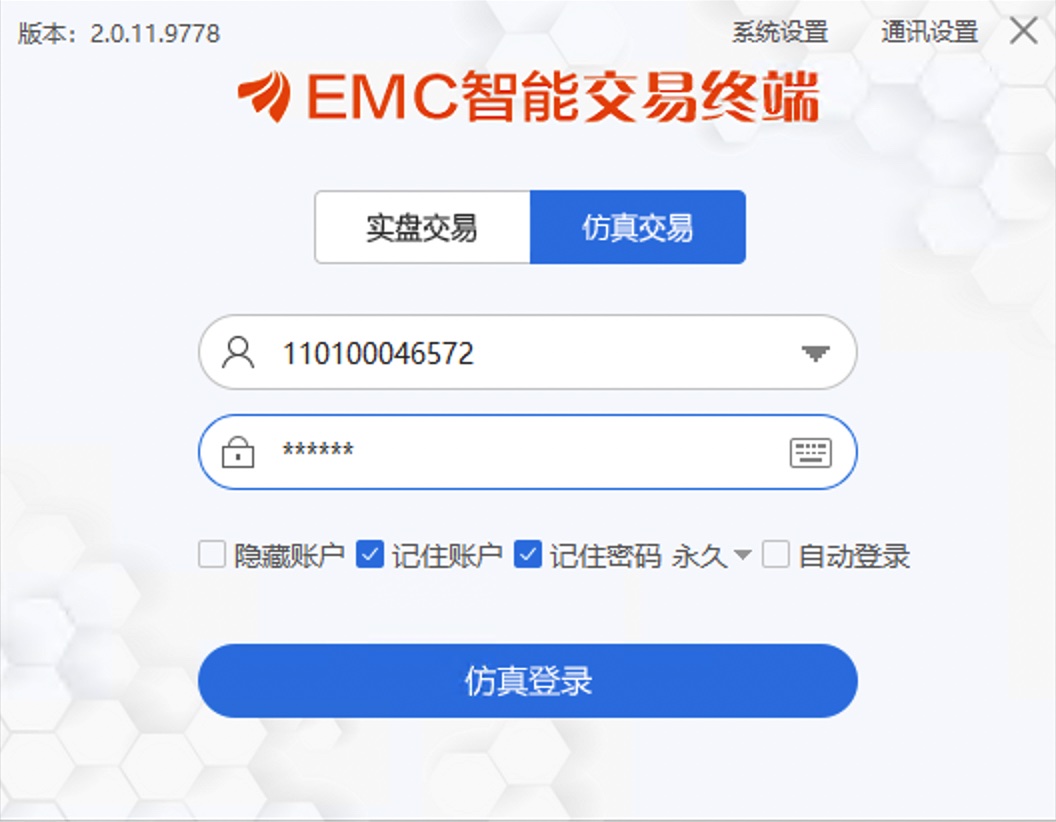
After logging in, the interface displays as follows:
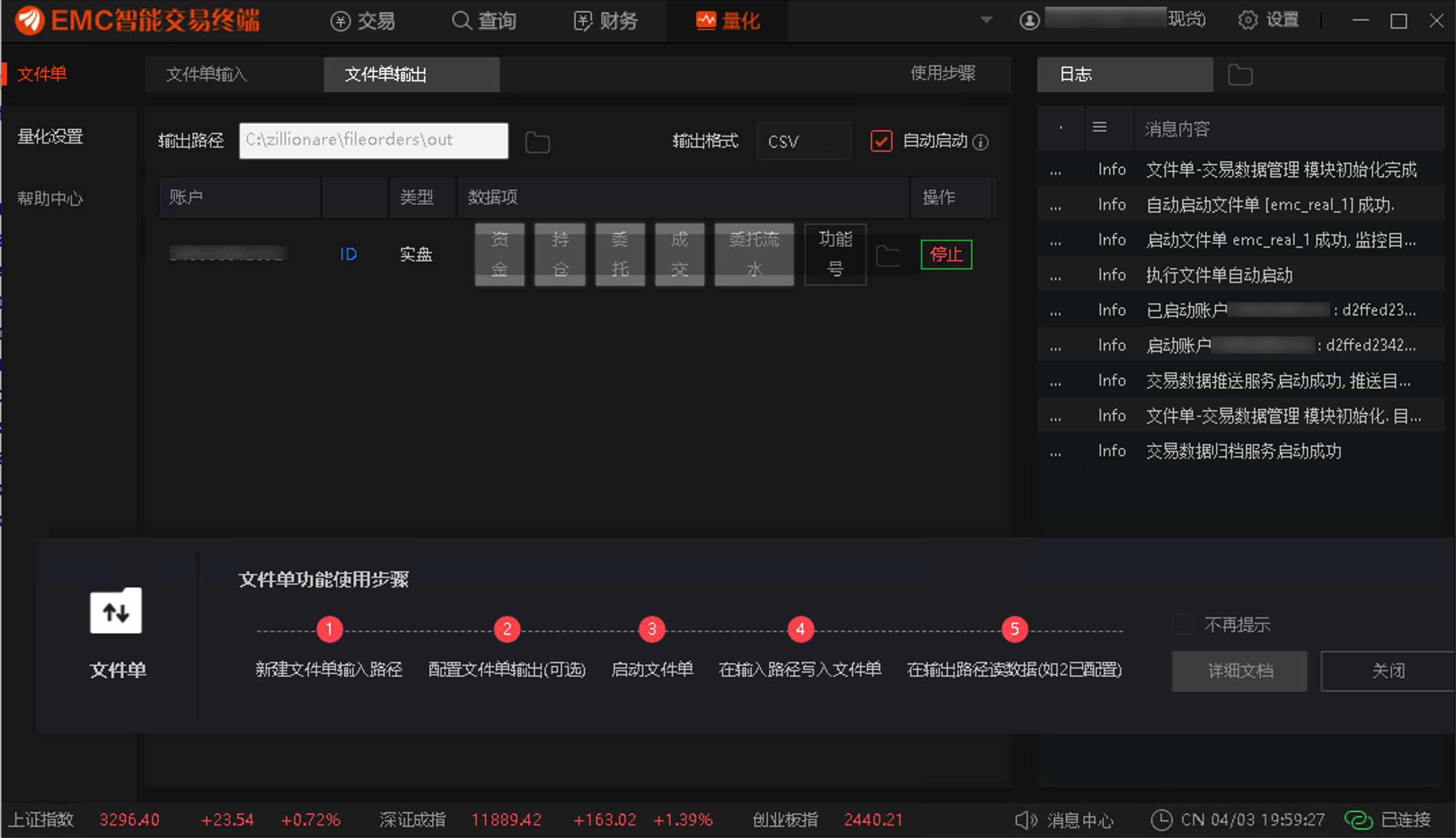
1.3.1. Account Configuration
The following steps are valid for both live and simulation accounts.
1.3.1.1. gmadaptor Configuration File
You need to configure your live trading account in the gmadaptor configuration file within the quantitative software. Create the gmadaptor/config directory in your user directory and place the following files there:
# defaults.yaml
log_level: INFO
server_info:
port: 9000
# client 使用这一token来访问 gmadaptor 提供的服务
access_token : "84ae0899-7a8d-44ff-9983-4fa7cbbc424b"
gm_info:
fake: false
# 文件单输出目录
gm_output: "~/gmadaptor/FileOrders/out"
trade_fees:
commission: 2.5
stamp_duty: 10.0
transfer_fee: 0.1
minimum_cost: 5.0
accounts:
# 账号名
- name: fileorder_s01
acct_id: 1a66e81c-ae5d-11ec-aef5-00163e0a4100
# 文件单输入目录。东财量化终端将从这里读取文件单
acct_input: "~/gmadaptor/FileOrders/inputs/fileorder_s01"In the above configuration, access_token can be any value you specify. Any client accessing this service must hold this token.
The gm_output/acct_input files are automatically created by gmadaptor upon startup if they do not exist. Ensure that gmadaptor has read/write permissions for these folders.
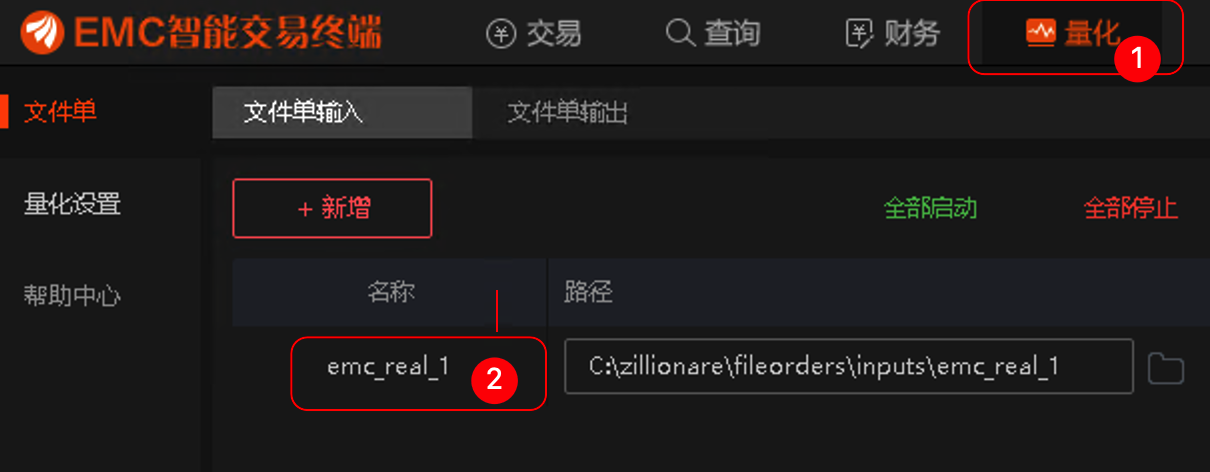
The value for accounts > name comes from the name you specified when creating a file order in the EMC terminal, as shown in item 2 in the image below:
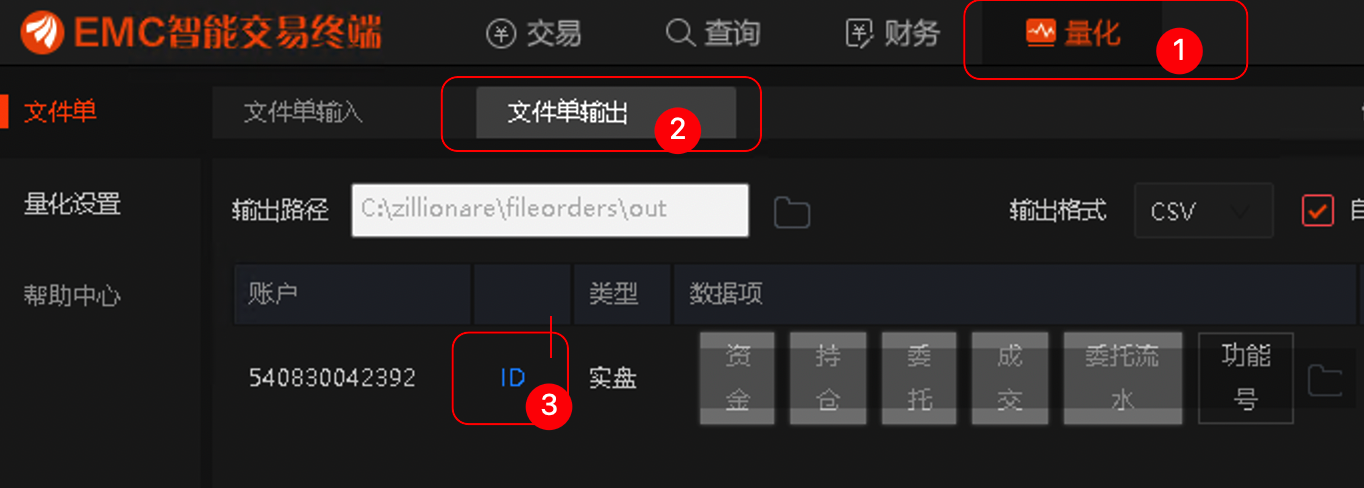
The accounts > acct_id comes from item 3 below. Click ID to copy it:
1.3.1.2. Configuring EMC
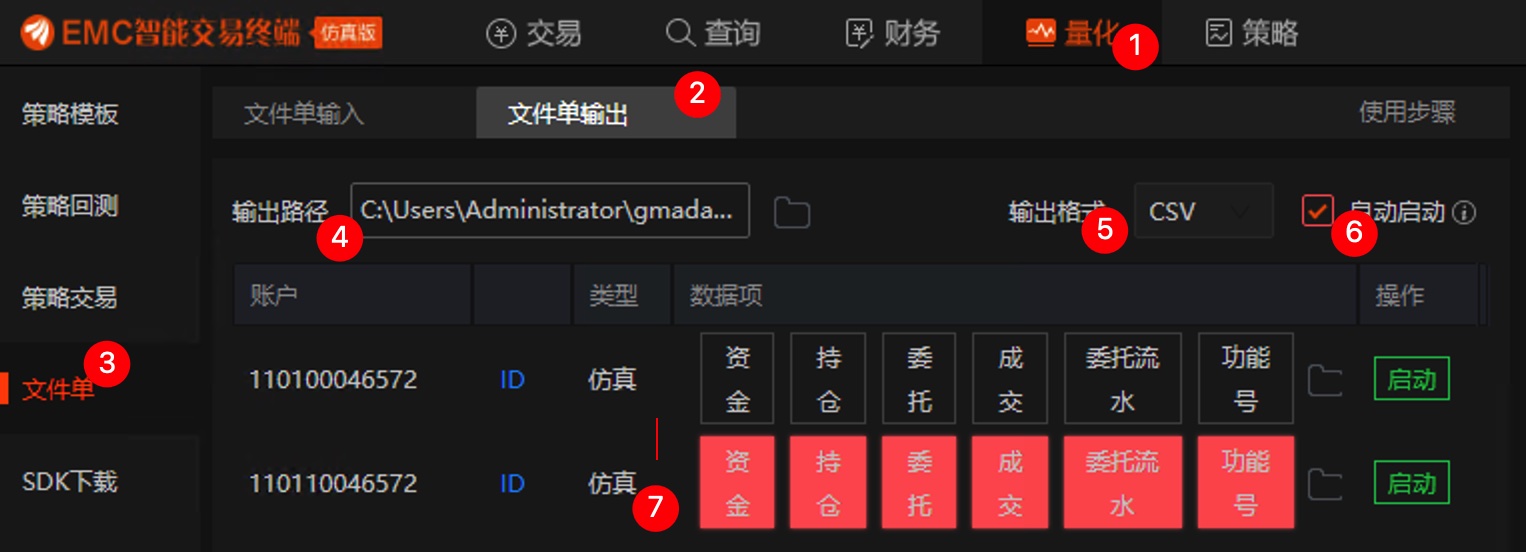
In Quant > File Order > File Order Output, configure items 4, 5, 6, and 7 in the image below. For item 4, select the path set in gm_output in our configuration file above; for item 5, select csv as the output format; for item 6, select "Auto Start"; and for item 7, select all items.
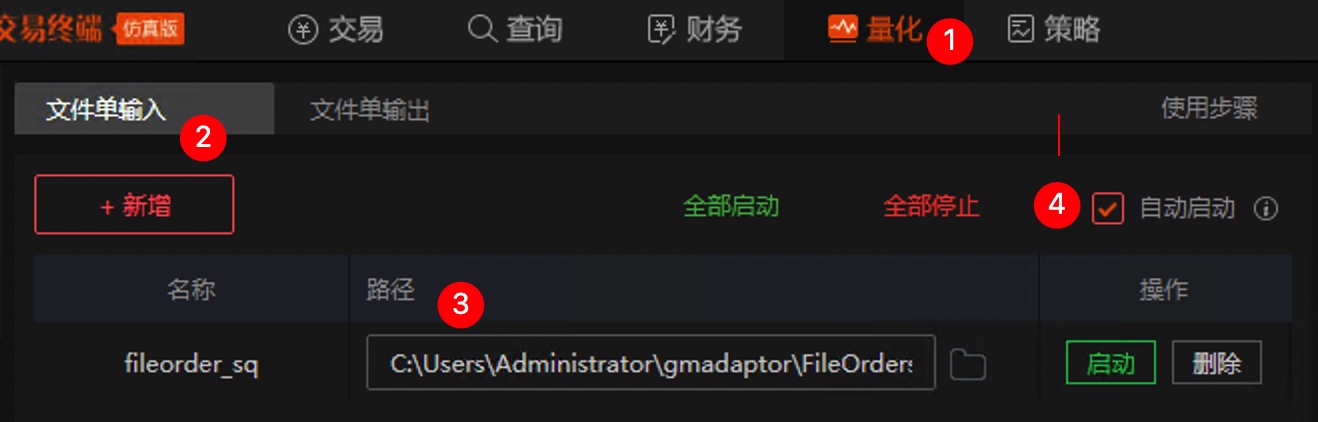
In Quant > File Order > File Order Input, configure items 3 and 4 in the image below. For item 3, select the acct_input path set in our configuration file above; for item 4, select "Auto Start".
1.3.2. Simulation Run
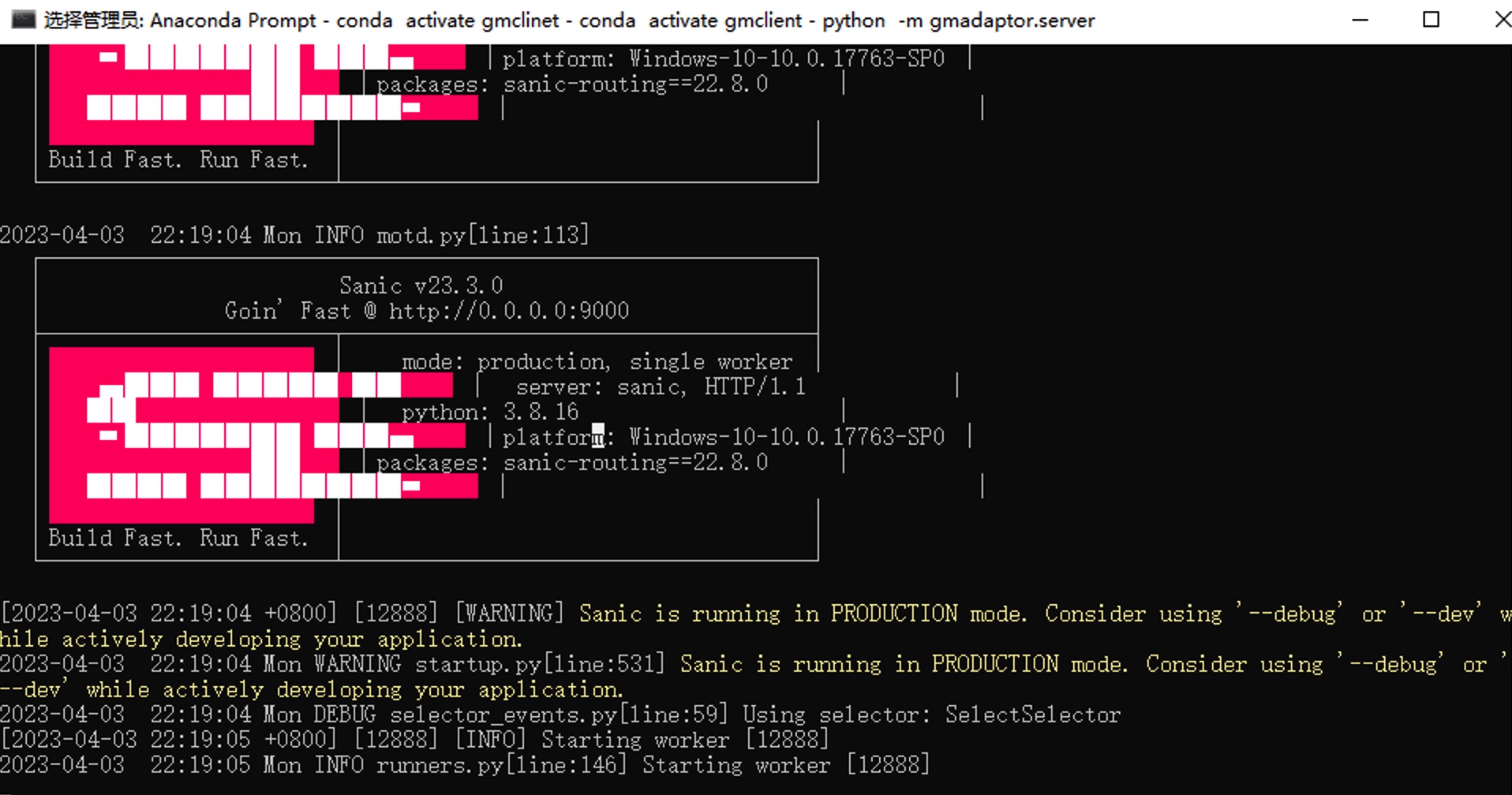
In the gmclient virtual environment generated earlier, execute the following command to start the gmadaptor server:
python -m gmadaptor.serverIf the following interface appears, the server has started successfully:
At this point, open another conda window, using the same gmclient virtual environment, and test via the following command:
python -m gmtest %account %token %server %portHere, account refers to gm_info > accounts > account_id in the gmadaptor configuration file, and token refers to server_info > access_token.
The server refers to the IP address of the machine where gmadaptor is located, and port is the port number. If not provided, these default to localhost and 9000, respectively.
If the configuration is correct, this will print the initial account funds, current positions, and information about one buy and one sell transaction.
1.4. Operation and Maintenance
Additionally, set up a scheduled task to start EMC around 8:45 AM every day.
1.4.1. Startup
Use the following script to start:
@echo off
call C:\ProgramData\Anaconda3\Scripts\activate.bat C:\ProgramData\anaconda3
call conda activate gmclient
python -m gmadaptor.server
pause1.4.2. Daily Maintenance
The EMC quantitative terminal can sometimes be unstable. We can improve stability by scheduling regular restarts. Use the following code to exit EMC after market close:
REM kill process
TASKKILL /F /IM EMCTrade.exe
REM sleep 5 seconds
TIMEOUT /T 5
REM remove all file orders after process killed
DEL /Q C:\zillionare\FileOrders\real_input\*.csvWarning
If there are unarchived files in the input/output directories, quantitative trading will not start automatically. The last line of the above code is designed to clean up unarchived files. This also requires users to verify their orders themselves to ensure these files can be automatically deleted.The client requests gmadaptor via HTTP requests. The following examples use synchronous requests, but you can change them to asynchronous requests as needed. Server authentication for the client is handled via headers. See the examples (any one example is sufficient) for details. Clients send data to the server using the POST method, and all gmadaptor methods only respond to POST requests. If the request completes successfully, the return code is 200.
In all operations, stock codes must appear in the format of short code + exchange suffix, where the Shanghai Stock Exchange is .XSHG and the Shenzhen Stock Exchange is .XSHE. During simulation testing, operations on stocks have specific responses (e.g., for a certain stock, buying will always result in partial execution regardless of the parameters provided; for another stock, it will always return "limit buy restricted," etc.). For specific response documentation, contact the administrator in the East Money Quantitative Q Group.
In requests that change state (such as buy operations), the cid and timeout parameters are often required. Their function is that the call waits for the specified timeout period for EMC to process the request and return results; however, EMC may not return results within the specified timeout, such as when a buy order price is too low and never executes, resulting in no return. In such cases, the call returns after the timeout. Subsequent queries for buy results will depend on the cid parameter. Note that cid is a required parameter, while timeout is optional.
The cid parameter (client entrust ID) is generated by the client. We recommend using the following code:
import uuid
cid = str(uuid.uuid4())After generating the cid, please save it on the client side until the transaction ends and it is no longer needed.
For brevity, the following examples may omit these codes:
import httpx
headers = {
"Authorization": "84ae0899-7a8d-44ff-9983-4fa7cbbc424b",
"Account-ID": "780dc4fda3d0af8a2d3ab0279bfa48c9"
}
_url_prefix = "http://192.168.100.100:9000/"
buy_entrust_no = None
sell_entrust_no = None2.2. Return Results
Errors can occur at three levels: the HTTP layer (including bad request or Internal server error), the gmadaptor layer, and the EMC layer.
For first-layer errors, we check via HTTP status codes. For example, if the client used is httpx, check if response.status_code is 200.
gmadaptor always returns responses via json. The response includes three fields:
status: int,如果为零,则表明在此层没有发生错误,即gmadaptor已经将请求正确上报
msg: str, human readable message
data: dict 如果一切顺利,则返回数据在此项中Third-layer errors are provided by the EMC trader. Even if gmadaptor correctly reports the request, the EMC trader may fail to execute it, at which point it will also provide error information via status and reason.
The following example shows the output of response.json():
{
"status": 0,
"msg": "OK",
"data": {
"code": "000001.XSHE",
"price": 0.0,
"volume": 100,
"order_side": 1,
"bid_type": 2,
"time": "2023-04-04 15:27:38.921555",
"entrust_no": "0d23bb4e-d81e-4ef2-ab21-c58e0fe6814f",
"status": -1,
"average_price": 0.0,
"filled": 0,
"filled_amount": 0,
"eid": "",
"trade_fees": 0,
"reason": "[Counter] [EMC_PC]不支持该下单类型",
"recv_at": "2023-04-04 15:27:38.924565"
}
}Therefore, even if the status provided by gmadaptor is successful, it does not necessarily mean the order was successfully executed. Another example is placing a buy order at an excessively low price; as long as the parameters are valid and received by EMC, gmadaptor will return success, but whether the order actually executes must be queried via entrust_no.
2.3. Asset Table
# 请求资金信息
import httpx
headers = {
"Authorization": "84ae0899-7a8d-44ff-9983-4fa7cbbc424b",
"Account-ID": "780dc4fda3d0af8a2d3ab0279bfa48c9"
}
_url_prefix = "http://192.168.100.100:9000/"
def get_balance():
r = httpx.post(_url_prefix + "balance", headers=headers)
resp = r.json()
if r.status_code == 200 and resp['status'] == 0:
print("\n------ 账户资金信息 ------")
print(resp["data"])2.4. Position Table
def get_positions():
r = httpx.post(_url_prefix + "positions", headers=headers)
resp = r.json()
if r.status_code == 200 and resp['status'] == 0:
print("\n----- 持仓信息 ------")
print(resp["data"])2.5. Limit Buy
r = httpx.post(_url_prefix + "buy", headers=headers, json={
"security": "000001.XSHE",
"price": 13,
"volume": 100,
"cid": str(uuid.uuid4()),
"timeout": 1
})
print(r.json())2.6. Market Buy
def market_buy():
global buy_entrust_no
r = httpx.post(_url_prefix + "market_buy", headers=headers, json={
"security": "000001.XSHE",
"volume": 100,
"cid": cid,
"timeout": 1
})
resp = r.json()
if r.status_code == 200 and resp["status"] == 0:
print("\n ------ 委买成功 ------")
print(resp["status"], resp["msg"], resp["data"])
buy_entrust_no = resp["data"]["entrust_no"]
else:
print("委买失败:", r.status_code, resp)2.7. Limit Sell
def sell():
global sell_entrust_no
r = httpx.post(_url_prefix + "sell", headers=headers, json={
"security": "000001.XSHE",
"price": 10,
"volume": 100,
"cid": cid,
"timeout": 1
})
resp = r.json()
if r.status_code == 200 and resp["status"] == 0:
print("\n ------ 限价委卖成功 ------")
data = resp["data"]
print(data)
sell_entrust_no = data["entrust_no"]
else:
print("卖出失败:", r.status_code, resp)2.8. Market Sell
def market_sell():
r = httpx.post(_url_prefix + "market_sell", headers=headers, json = {
"security": "000001.XSHE",
"volume": 100,
"cid": cid
})
resp = r.json()
if r.status_code == 200 and resp["status"] == 0:
print("\n ------ 市价委卖成功 ------")
print(resp["data"])
else:
print(resp)2.9. Cancel Order
def cancel_entrust():
global buy_entrust_no
r = httpx.post(_url_prefix + "cancel_entrust", headers=headers, json = {
"entrust_no": buy_entrust_no,
"timeout": 1
})
resp = r.json()
print(resp["status"], resp["msg"], resp["data"])
2.10. Query Today’s Orders
def today_entrusts():
r = httpx.post(_url_prefix + "today_entrusts", headers=headers, json = {
# 此处可以传入记录的委托号。传入空数组时,表明取当天所有委托。
"entrust_no": [],
"timeout": 1
})
resp = r.json()
print(resp["status"], resp["msg"], resp["data"])3. Troubleshooting and Help
For East Money File Order, please refer to: https://emquant.18.cn/file-help/?doc=file_order East Money Quantitative Q Group: 971584613
Even with daily automatic restarts of EMC, occasional connection anomalies or other errors may occur. In such cases, manual execution may be required:
- Reconnect
- Clear file orders and restart
Matching Configuration Rules
In simulation trading tests, EMTrader specifies corresponding responses for each product. For example, for product 000572, buying will always result in full execution, while for product 000010, it will always be rejected. This is for testing convenience. East Money provides a document titled "Matching Configuration Rules," which may be updated at any time. Therefore, you need to contact their technical staff via QQ to obtain it before testing.
The content of this document in March 2023 was as follows:
[全部成交]
000572 full
000725 full
[分笔成交]
分成两笔:
000002 lot 2
[部分成交] 成交一半
000001 part
000004 part
...
[挂单] 只有响应,没有成交
018014 pending
020417 pending
...
[拒单]
000010 reject
010609 reject
[拒绝撤单] 部分成交,不可撤单
000008 cancel_reject
000151 cancel_rejectContact Information
If you need help using this module or wish to participate in the Big Fortune Quantitative Programming Practical Course, please add Kuanfen’s WeChat:
