
Python Best Practices for Quant Researchers: Code Quality
Even in quantitative research, writing high-quality code is critical. No matter how brilliant an idea is, it holds no value if not implemented correctly. A strategy is only truly realized when it is correctly implemented and validated through backtesting.
For quantitative developers, the importance of writing high-quality code is self-evident. This notebook outlines Python best practices.
Dependency Hell and Its Solutions

In quantitative research, we often rely on third-party packages. These packages, in turn, depend on other third-party libraries. If two or more packages depend on the same library but require different versions, we encounter "dependency hell."
Many quantitative researchers ruin their research environments by constantly experimenting with new technologies and Python libraries. These new libraries often have third-party dependencies that conflict with existing ones. Forcing an overwrite can break previously functional Python libraries.
Resolving dependency hell requires addressing the issue at multiple levels.
First, we should create a new virtual environment for each new research project. Since only essential software libraries are installed in this isolated environment, the likelihood of conflicts is significantly reduced.
Second, we must manage dependencies correctly to minimize conflicts. This is primarily achieved through poetry.
Virtual Environments
There are many ways to build virtual environments in Python. As quantitative researchers, mastering conda is sufficient. Other options include virtualenv, venv, and pipenv. As Quant Developers (QDs), you should be familiar with venv, a standard Python library for creating lightweight, fast virtual environments.
Semantic Versioning
In software development, we constantly patch and update software. Each update retains most of the original code and functionality, fixes bugs, and introduces new components.
An ancient thought experiment, the Ship of Theseus problem, describes this exact scenario:

The Ship of Theseus problem originates from Plutarch’s writings in the first century AD. It describes a ship that can sail for centuries. As each wooden plank rots, it is replaced. Eventually, every functional component has been replaced. The question is: is the final ship still the original Ship of Theseus, or is it a completely different ship? If it is no longer the original ship, at what point did it cease to be so?
This question arises in many fields. For instance, IBM, a century-old enterprise, has had CEO after CEO. Is it still the IBM that was originally founded? In software development, we face the same dilemma. Every time we fix a bug, we replace a "plank." As patches and replacements accumulate, we inevitably face the Ship of Theseus question: Is the current software still the original software? If not, when did it stop being so?
The core solution to this problem is semantic versioning. Versions are segmented into three parts: major.minor.patch.
- Major version: Incremented for breaking changes.
- Minor version: Incremented when new features are added while maintaining backward compatibility.
- Patch version: Incremented for bug fixes or security updates without functional changes.
When using third-party libraries, we can configure automatic updates for patches or minor versions while rejecting automatic major updates.

Once third-party libraries adhere to this convention and declare their versions, we can manage project dependencies using poetry.
poetry is a dependency management tool. Before using poetry, you may have managed project dependencies via requirements.txt. The drawback of requirements.txt is that it does not check whether the added dependencies are compatible with other software. poetry, however, does.
Therefore, when starting a new strategy research project, we should first create a new project environment using conda, then add project dependencies via poetry:
conda create -n new_project python=3.11
poetry init
poetry add pandasWith this setup, every time we add a new dependency, poetry automatically checks for compatible versions. If no suitable version is found, it throws an error, giving us the opportunity to consider alternative solutions.
Writing Clean Code
When writing code, we each have our own style. This includes variable naming conventions (camelCase vs. snake_case), word separation, and the use of spaces and indentation. To standardize style, Guido van Rossum and others proposed a style guide for Python code in 2001, known as PEP 8.

The purpose of PEP 8 is to improve Python code readability and ensure consistent style across different developers. PEP 8 covers code layout and naming conventions, such as starting class names with capital letters, function names with lowercase letters, and separating words with underscores.
PEP 8 contains many rules. In practice, we do not need to memorize them. By using the correct code formatting tools, the final code will naturally comply with PEP 8 standards. Alternatively, linting tools will flag errors, which we can then fix.
Generally, configuring black as the code formatter ensures compliance with PEP 8 requirements.
black is recommended because it is largely unconfigurable. In fact, customizing code style is often meaningless. Just as you might find yourself appreciating someone’s appearance after looking at them long enough, black’s success lies in its uncompromising nature. Its motto is "uncompromising formatter." Sometimes, sticking to your style, even if it seems rigid, leads to better outcomes.
Syntax Checking Tools
Before running code, we can use tools to check for coding errors. These are called linting tools. Common configurations include flake8, isort (for sorting imports), and mypy (for type checking).
Type Hints
Type hints help IDEs provide code auto-completion and allow us to catch errors early. This feature was introduced in Python 3.4 and fully integrated into the framework by Python 3.8.
Python is a dynamically typed language. It has types, but type checking occurs only at runtime:
>>> one = 1
... if False:
... one + "two" # This line won't execute, so no TypeError is raised
... else:
... one + 2
...
3
>>> one + "two" # Type checking occurs here, raising TypeError
TypeError: unsupported operand type(s) for +: 'int' and 'str'
... one = "one " # Variable types can change via assignment
... one + "two" # No type error now
one twoThe above code demonstrates that during the coding phase, Python and the IDE do not提示 any type errors. Thus, the first segment of code never raises an error. However, if we execute 1 + "two", we get a TypeError, indicating that int and str cannot be added. This is runtime checking.
If we write code according to type hint requirements, we can catch errors early, as shown in the following example:
def foo(name: str) -> int:
score = 20
return score
foo(10)In this code, if we place the cursor over foo(10) in an IDE (e.g., VS Code), we will see an error prompt:
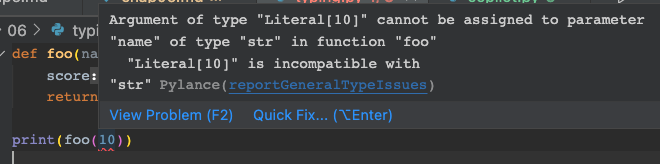
This allows us to detect incorrect arguments passed to the foo method before execution.
The following code demonstrates common type hint usages:
# Declare variable types
age: int = 1
# Variables do not need to be initialized when declaring their type
child: bool
# If a variable can be of any type, declare it as Any.
# Zen of Python: explicit is better than implicit
dummy: Any = 1
dummy = "hello"
# If a variable can be of multiple types, use Union
dx: Union[int, str]
# From Python 3.10+, you can also use the following syntax
dx: int | str
# If a variable can be None, use Optional
dy: Optional[int]
# For Python builtin types, use the type name directly, e.g., int, float, bool, str, bytes, etc.
x: int = 1
y: float = 1.0
z: bytes = b"test"
# For collections types, if using Python 3.9+, use the type name directly:
h: list[int] = [1]
i: dict[str, int] = {"a": 1}
j: tuple[int, str] = (1, "a")
k: set[int] = {1}
# Note the list[], dict[] syntax above. If we use list(), it becomes a function call, not a type declaration.
# However, for Python 3.8 and earlier, use types from the typing module:
from typing import List, Set, Dict, Tuple
h: List[int] = [1]
i: Dict[str, int] = {"a": 1}
j: Tuple[int, str] = (1, "a")
k: Set[int] = {1}
# If you are writing decorators or public libraries, you may frequently use the following types
from typing import Callable, Generator, Coroutine, Awaitable, AsyncIterable, AsyncIterator
def foo(x:int)->str:
return str(x)
# In Callable syntax, the first parameter is the function's argument type (a list), and the second is the return type
f: Callable[[int], str] = foo
def bar() -> Generator[int, None, str]:
res = yield
while res:
res = yield round(res)
return 'OK'
g: Generator[int, None, str] = bar
# We can also declare the return value of the above function simply as Iterator:
def bar() -> Iterator[str]:
res = yield
while res:
res = yield round(res)
return 'OK'
def op() -> Awaitable[str]:
if cond:
return spam(42)
else:
return asyncio.Future(...)
h: Awaitable[str] = op()
# The above variable type definitions can also be used for function parameter and return type declarations, e.g.:
def stringify(num: int) -> str:
return str(num)
# If a function has no return value, declare it as returning None
def show(value: str) -> None:
print(value)
# You can create an alias for an existing type
Url = str
def retry(url: Url, retry_count: int) ->None:
pass
If you are coding in VS Code, it includes the pylance tool, which infers type mismatches based on the type hints you provide, allowing you to eliminate errors early.
If you are accustomed to using notebooks for strategy research, you can also create notebooks in VS Code, where pylance assistance is available.
tip
VS Code's Jupyter notebook implementation outperforms the native Jupyter notebook in many aspects, despite potential layout differences. For example, it offers syntax checking, remembers the last edit position for navigation, and supports cell debugging.During strategy development, we should extensively use unit tests. Unit tests serve two main purposes: first, to learn how to use third-party libraries; second, to ensure that our reusable functional modules are thoroughly tested.
Unit testing is not complex. The main challenge lies in isolating the code under test from other parts of the system. Here, we generally use mock objects.
# Replace cfg4py.core.dispatch with a mock object using mock.patch
@mock.patch("cfg4py.core.dispatch")
def test_013_watch(self, mocked_handler):
# After the mock object is called, we can check how many times it was called via call_count
self.assertTrue(mocked_handler.call_count > 3)
# We can also use mock to simulate exceptions during calls
with mock.patch(
"sys.exit", lambda *args: early_jump("no files in folder")
):
# Replace a specific method of an object (here, qfq):
with mock.patch.object(Stock, "qfq") as mocked_qfq:
mocked_qfq.assert_called()
# To modify system time, use freezegun's freeze_time method
# After executing the following statement, calling datetime.datetime.now() will
# return 2022-02-09 10:33:00 instead of the actual system time
@freeze_time("2022-02-09 10:33:00")
async def test_get_cached_bars_n(self):
pass
# If our program requires user input, testing cannot be automated.
# In such cases, we need to mock builtins.input and return fake user input via side_effect.
with mock.path('builtins.input', side_effect=..):
passMore
For more Python programming best practices, please read Python for Large Projects.
In addition to covering the above topics (in greater detail), this book also introduces code version management (using Git), continuous integration (CI/CD), and how to write and generate technical documentation.