
Sector Data in xtquant: Constituents and Index Prices
Key Takeaways
xtquant is a Python library that provides market data and live-trading interfaces. As long as your broker supports QMT and you have been granted access to the quantitative interface, you can use this data and live-trading API for free — currently one of the most cost-effective options with the lowest barrier to entry. That is why we are covering this library in a series of notes.
Today we explore how sectors are organized in xtquant. The official documentation covers part of this, but it never connects the dots on how to actually use the APIs. Some of the details below came directly from asking the vendor, so for a while this may remain exclusive material worth bookmarking.
What Sectors Are Available in Xtquant
The sector list in xtquant is returned by get_sector_list. The result is a list of strings:
from xtquant import xtdata
sectors = xtdata.get_sector_list()
for i in range(0, len(sectors), 6):
print(" ".join(sectors[i:i+6]))You will get back more than 5,000 sector names. Here is an excerpt:
上期所上证 A 股,上证 B 股,上证期权,上证转债,中金所
创业板,大商所,板块加权指数,板块指数,概念指数,沪市 ETF
沪市债券,沪市基金,沪市指数,沪深 A 股,沪深 B 股,沪深 ETF
迅投一级行业板块指数,迅投三级行业板块加权指数,迅投三级行业板块指数
郑商所,香港联交所指数,香港联交所股票,ETF 主题指数,ETF 债券型,ETF 商品型
ETF 股票型,ETF 行业指数,ETF 货币型,ETF 跨境型,TGN3D 打印,TGN5G
TGNMicroLED 概念,TGNMiniLED,TGNMLOps 概念,TGNMR
...There are quite a lot of sectors. Here are the important categories:
Index Sectors
About 80 names contain the word “index”. In other words, these sectors are composed of index codes:
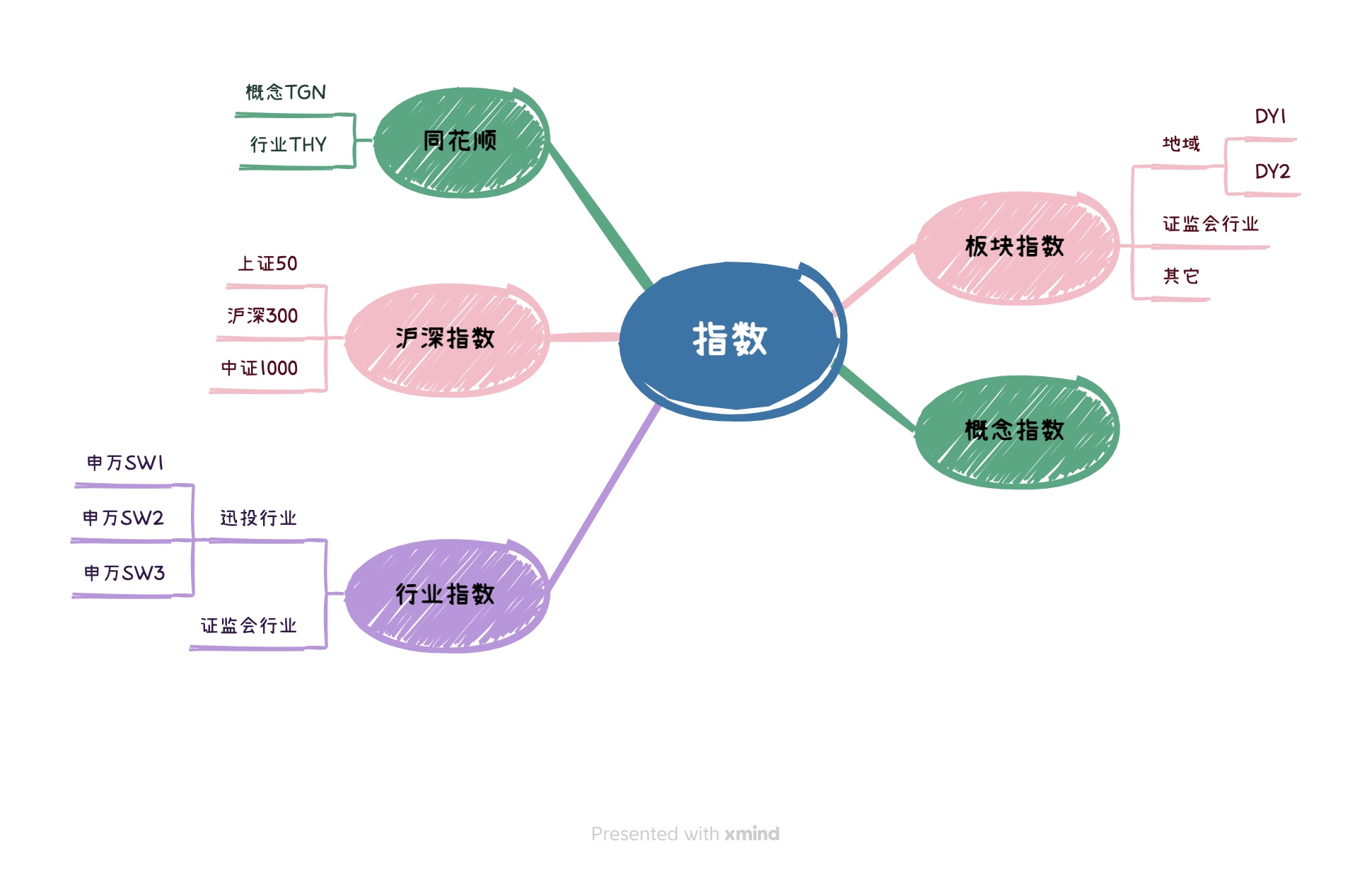
Let us see which indices make up the HS Indices sector (沪深指数):
for sector in xtdata.get_stock_list_in_sector('沪深指数'):
detail = xtdata.get_instrument_detail(sector)
name = detail["InstrumentName"]
print(sector, name)There are about 600 indices here, including the ones we use most often, such as the SSE Composite (000001.SH), SSE 50, CSI 300, and so on. If you want market data for the CSI 1000 but do not know its code, you can look it up here:
for sector in xtdata.get_stock_list_in_sector('沪深指数'):
detail = xtdata.get_instrument_detail(sector)
name = detail["InstrumentName"]
if name == "中证 1000":
print(sector)The codes are “000852.SH” and “399852.SZ” — the CSI 1000 symbols on the Shanghai and Shenzhen exchanges, respectively. You can then pull its market data using the method introduced in the previous note:
xtdata.download_history_data("399852.SZ", period="1d")
xtdata.get_market_data(stock_list=["399852.SZ"], period='1d', count=10)Concept and Tonghuashun Concept Sectors
Note the “Concept Indices” sector (概念指数). We can list the indices it contains with:
for code in xtdata.get_stock_list_in_sector("概念指数"):
detail = xtdata.get_instrument_detail(code)
name = detail["InstrumentName"]
print(sector, name)Partial output:
102566.BKZS GNoled 材料
101285.BKZS GN 龙虎榜热门
102109.BKZS GN 太阳能
102512.BKZS GN 安邦系
101602.BKZS GN 饲料
101219.BKZS GN 室外经济But there seems to be no way to fetch index prices for these sectors. We are still checking with the vendor and will report back once we hear from them. If you need these sector indices right now, you can manually compute an equal-weighted index.
Take GNoled Materials (GNoled 材料) as an example. We can get its constituents and then pull market data for all of them:
secs = xtdata.get_stock_list_in_sector('GNoled 材料')
xtdata.download_history_data2(secs, period='1d', start_time="20231220")
barss = xtdata.get_market_data(stock_list=secs, count=10)
barssThe output looks like this:
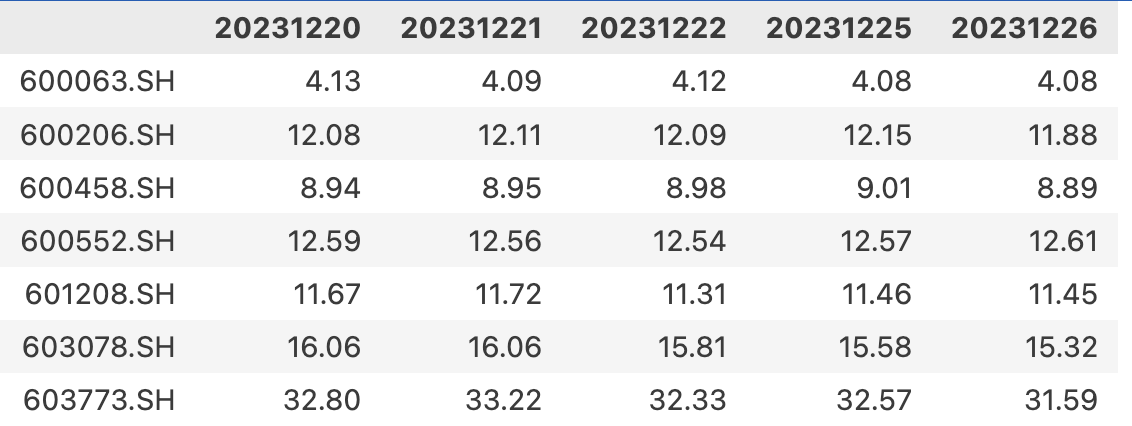
We compute the equal-weighted index as follows — note the transpose here, and the axis=1 argument when taking the mean.
barss["close"].T.mean(axis=1)Which gives:
20231220 19.030909
20231221 19.072121
20231222 18.880909
20231225 18.978485You will notice many sector names starting with T, such as TGN, THY, and so on. The official documentation does not explain them, but the guess is they stand for Tonghuashun concepts and Tonghuashun industries.
Shenwan Industry Sectors
If you want sectors based on the Shenwan industry classification, query them like this:
for code in xtdata.get_stock_list_in_sector("迅投一级行业板块指数"):
detail = xtdata.get_instrument_detail(code)
name = detail["InstrumentName"]
if name.startswith("SW"):
print(code, name)This returns Shenwan Level-1 industry sectors. For Level-2 and Level-3, use the Level-2 and Level-3 Xuntou industry sector indices, respectively. But again, index prices do not seem to be available for them either.
Convertible Bonds
We can find all convertible bonds and get their codes and names with:
for sector in xtdata.get_sector_list():
if sector.find("可转债") != -1:
print(sector)
xtdata.get_stock_list_in_sector("沪深 A 股")
xtdata.get_stock_list_in_sector("可转债等权")
xtdata.get_instrument_detail("110047.SH")This outputs 110043SH Wuxi Convertible Bond (无锡转债). From its code, you can then pull its market data.
Summary
tip
1. In xtquant, get_sector_list returns a list of sector names. From a sector name, you can further retrieve its constituents.2. Among the returned values is a special type of sector whose name contains the word “index”.
3. Index sectors such as HS Indices (沪深指数) contain our most common and widely used indices, such as the SSE Composite and CSI 300, for which market data is available.
4. Other sectors, even those with “index” in the name such as Concept Indices (概念指数), do not seem to provide downloadable index prices.
5. For sectors without an available index, you can manually compute an equal-weighted index.